You are here: Firm Administrator Dashboard >
Search Feature in FADB
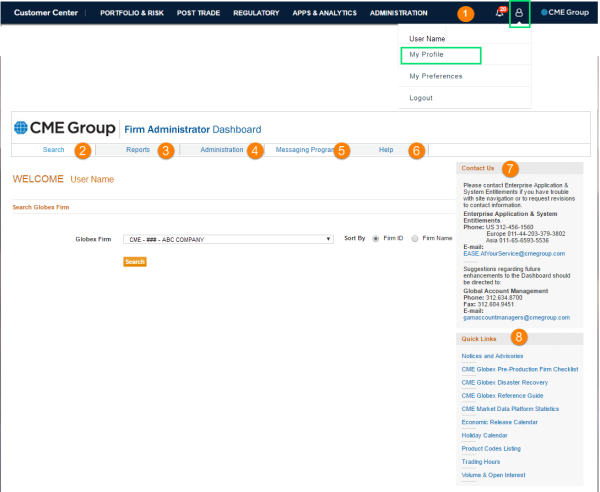
The Main Menu shows functional tabs for searching Firms, Users, Contacts and Quick lists. The available tabs are based on assigned entitlements. The following functionality is available:
|
- Navigation Bar - Access CME Group enabled applications from the Portfolio & Risk, Post Trade, Regulatory, Apps & Analytics, and Administration drop-down menus; modify your profile from the Profile icon and select My Profile.
- Search
- Reports - View system activity in a variety of reports. Available to clearing firm administrators only.
- Administration
- Change Log - Audit cancel on disconnect. Available to clearing firm administrators with Update - all or Update - partial entitlements.
- CME Application - View Globex firm entitlements for other CME Group applications.
- Self-Match Prevention - Enables a Globex firm to prevent buy and sell orders for the same account or common beneficial ownership from matching.
- Contact Management - Add or delete MEP contacts to or from a Globex firm. Available to clearing and Globex firm administrators only.
- Messaging Program
- Request for Waiver (RFW) - A clearing firm administrator or a Globex firm representative may submit a Request for Waiver (RFW) if they believe there is a justification for exceeding the messaging threshold.
- User Manual / Webhelp - Access the online webhelp system or a printable user manual.
- Contact Us - Lists contact information for application assistance or Global Account Management (GAM).
- Quick Links - Links to related systems and information resources.
|


