User Help System
Getting Started
CME Direct offers side-by-side access to CME listed Futures, Options, and OTC markets—all on one screen. Offering electronic trading of options and futures, aggregated OTC broker markets combined with straight-through processing and straight-through clearing via CME ClearPort, CME Direct helps you work more efficiently and effectively.
CME Direct Firm Admin allows Trader and Broker Administrators to manage a number of user permissions and limits from the CME Direct Trading Client. Using the Firm Admin tool, Administrators can perform the following functions on behalf of the users for each applicable company:
- View User Permissions
- Manage Users
- Disable Users
- Maintain Clearing Accounts
- Manage Trading Limits (set clip sizes per user)
- Edit Desk Assignments
- Export an Audit Trail of CME Globex Activity
Note: For additional CME Direct information, refer to the CME Direct Home Page.
Logging into CME Direct
The CME Direct Firm Admin uses CME Group Login two-factor authentication, a self-managed, centralized user profile service that authenticates access to CME Group applications and services. CME Group Login users, currently accessing CME Direct, can use their existing CME Group Login ID to also access CME Direct Mobile (once they have been assigned the proper permissions).
To log in, follow the instructions detailed in to the CME Group Login Help.
Accessing User Admin
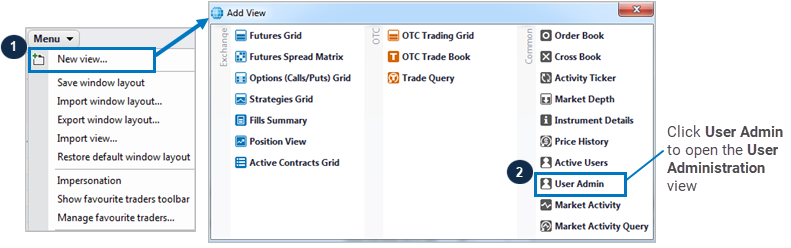
The User Administration window allows Firm Admins to identify users and view permissions for those users.
- To access the User Admin window:
Click Menu>New View>User Admin.