User Help System
Manage Trading Limits
Use the Manage Trading Limits window to create Trading Limit Profiles and assign maximum quantity limits to those profiles. Users with multiple profiles are assigned the most restrictive profile (limits).
The Manage Trading Limits window also allows Firm Admins to view maximum quantity limits, and accounts credit exposure limits.
Note: Set quantity limits on a per product basis and for Outrights, Intra-Commodity Spreads, Strips, and Inter-commodity Spreads.
- To manage trading limits:
- From the User Administration window, right-click a user row, and select Manage trading limits.
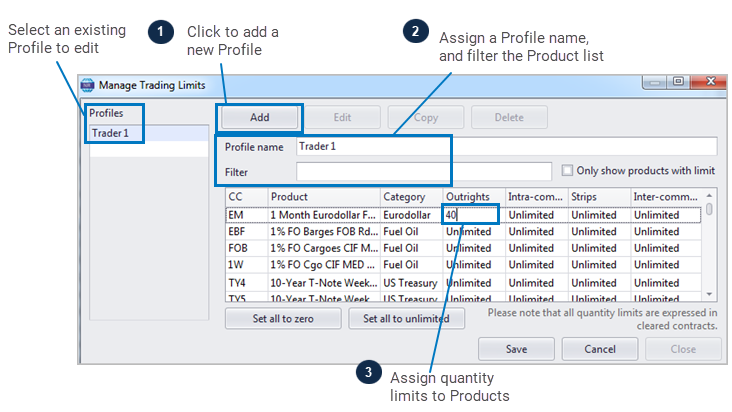
The Manage Trading Limits window appears
- Click Add and a list of products available to the user display in the main trading limit pane.
- In the Profile name field assign the profile an identifier.
- Optional: Use the Filter field to display certain products only.
- Optional: Click the Only show products with limit box to remove products labeled Unlimited from the display.
- Optional: Use the following quantity buttons to automatically set default quantity limits:
- Set all to zero - The user cannot trade even a single quantity
- Set all to unlimited - The user can trade any quantity
- Manually type a maximum quantity (clip size) for Outrights, Intra-Commodity Spreads, Strips, or Inter-Commodity Spreads for the product of your choosing.
- Click Save.
New Profiles are added to the Profiles list and can be selected when editing or setting quantity limits.
Note: Firm Admins can only create and maintain a Company Max Order Quantity in CME Direct.
Selecting an Existing Profile
Trading Limit Profiles allow administrators to apply a set of quantity limits to the orders entered by an existing user profile.
- To select an existing Trading Limit Profile:
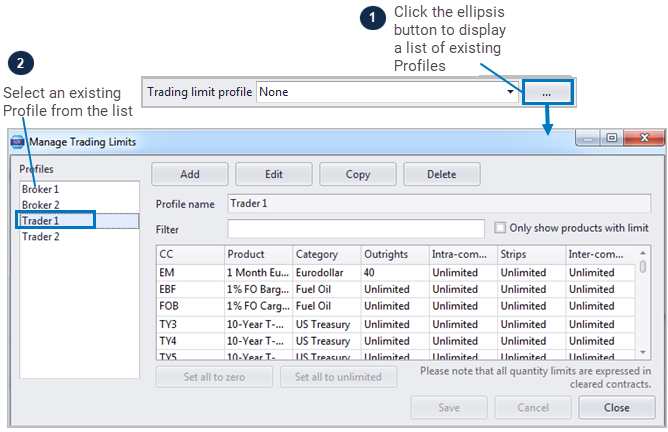
- From the Manage User window, click the Trading limit profile drop-down list and select a profile.
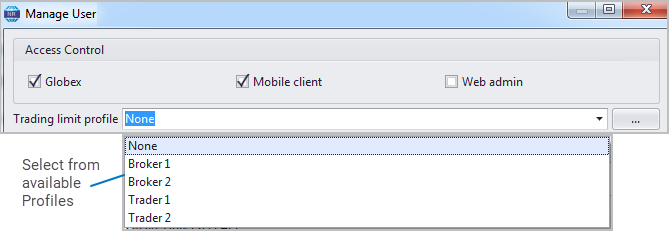
The assigned profile appears in the Trading Limit Profile column on the User Administration window.
- To the right of the Trading limit profile field, click the ellipsis button, and select a profile from the Manage Trading Limits window.