User Help System
Export Audit Trail
CME Direct allows Firm Administrators to export an audit trail of CME Globex activity. The export window allows filtering of the exportable data by one or more of the following: Company, User, Clearing Member, Clearing Account.
- To export an Audit Trail:
The audit trail contains a record of trading activity.
- From the main Menu, click Download Globex message audit trail.
The Download Globex Message Audit Trail window appears.
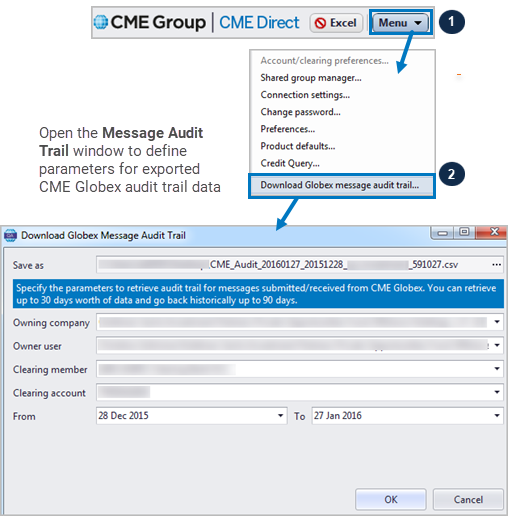
- Enter data in one or more of the following fields as required: Owning company, Owner user, Clearing member, Clearing account.
- Sort additional fields to narrow the audit trail as needed.
For example, selecting both an Owning company filters the CME Globex activity for that particular company, while also selecting an Owner user, filters the export for a user from the owning company.
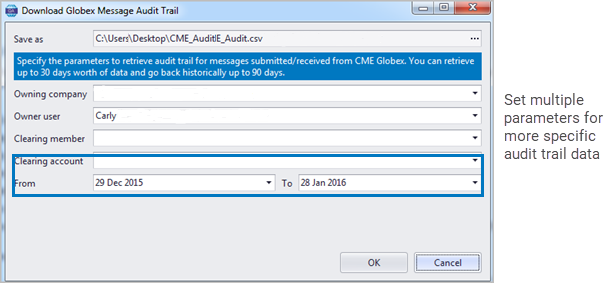
- Set the dates in the From/To fields to filter the exported data for a given period, and click OK.
Note: Retrieve as many as 30 days of data spanning a maximum of 90 days.
A notification message appears, as well as a progress bar that displays the number of records retrieved.

- To view your exported records, click Yes on the notification.
Results display in a spreadsheet that opens automatically.

Note: As required by market regulators, all audit data will export in a .csv file format only.
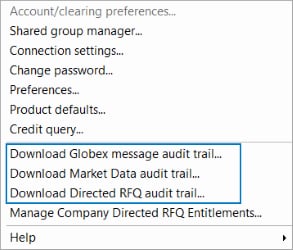
Additional audit trails include Market Data and Directed RFQ.
Audit Trail columns include the following:
| .csv Column | Column Heading |
|---|---|
| A | Sending Timestamps |
| B | Receiving Timestamps |
| C | Message Direction |
| D | Operator ID |
| E | Self-Match Prevention ID |
| F | Account Number |
| G | Session ID |
| H | Executing Firm ID |
| I | Manual Order Identifier |
| J | Message Type |
| K | Customer Type Indicator |
| L | Origin |
| M | CME Globex Message ID |
| N | Message Link ID |
| O | Order Flow ID |
| P | Spread/Leg Link ID |
| Q | Instrument Description |
| R | Market Segment ID |
| S | Client Order ID |
| T | CME Globex Order ID |
| U | Buy/Sell Indicator |
| V | Quantity |
| W | Limit Price |
| X | Stop Price |
| Y | Order Type |
| Z | Order Qualifier |
| AA | IFM Flag |
| AB | Display Quantity |
| AC | Minimum Quantity |
| AD | Country of Origin |
| AE | Fill Price |
| AF | Fill Quantity |
| AG | Cumulative Quantity |
| AH | Remaining Quantity |
| AI | Aggressor Flag |
| AJ | Source of Cancellation |
| AK | Reject Reason |
| AL | Processed Quotes |
| AM | Cross ID |
| AN | Quote Request ID |
| AO | Message Quote ID |
| AP | Quote Entry ID |
| AQ | Bid Price |
| AR | Bid Size |
| AS | Offer Price |
| AT | Offer Size |
| AU | Request Time |
| AV | Order Notes |
| AW | Trading Company Name |


