User Help System
Manage User
The Manage User feature allows Administrators to define user access, access trading limit settings, define roles and sub-roles, and grant market permissions based on venue and product category.
- To access the Manage User window:
From the User Administration window, right-click a row, and select Manage User login'user name'.
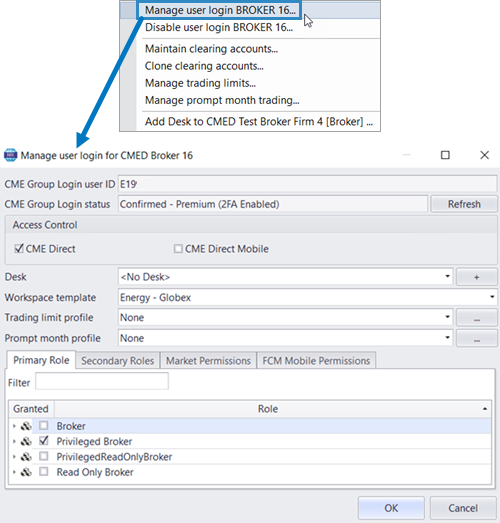
The CME Group Login user ID and CME Group Login status fields identify the user and confirms their log in status.

Use the Access Control section to define whether a user has access to the Trading Client, the CME Direct mobile version, or Web Admin access.

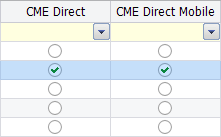
Admins can also assign access control by clicking in the CME Direct and/or CMED Direct Mobile column
Use the Trading Limit Profile field to access the Manage Trading Limits window and create a user (clip size) profile by setting quantity limits on any available products.

Use the Workspace template field to define the market.

Use the Prompt month profile field to assign a profile used to manage restrictions on trading.

Admin Panel User Filters
The Admin panel includes pre-defined filters that Admins can use to display only specific users.

Firm Admins can select from the following filters:
- All - Displays all users
- New Users - Displays users without User Logins
- Disabled Users - Displays users with disabled User Logins
- Inactive Users - Displays users with User Logins, but without a retrievable UR Number
Note: Use the Add Custom Filter feature to create your own panel filter by assigning a Name and Color.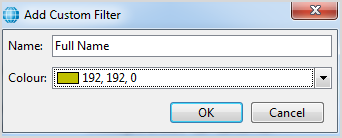
Market Permissions
Use the Market Permissions tab to grant users permission to specific products on a particular exchange.
The message bar at the top of the tab lists the exchanges for which the user will be charged.

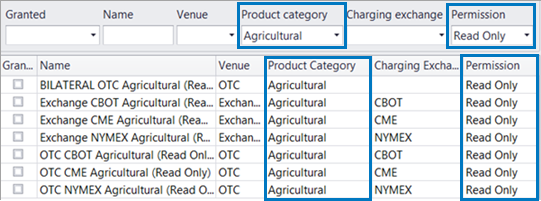
Customize the displayed list of Market Permissions using the Granted, Name, Venue, Product Category, Charging Exchange, and Permission filters.

- To grant products to a user:
- From the Market Permissions tab, in the Granted column, select the products you wish to permission to the user.
Note: Users cannot trade products that are not granted to them.
- Optional: Right-click in the main grid to select from the following granting options:
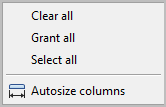
- Optional: Use the filter fields at the top of the Market Permissions tab to narrow the permissions list. For example, if granting read-only permissions on Ags products specifically, select Agriculture from the Product category list and Read Only from the Permission list.
Roles
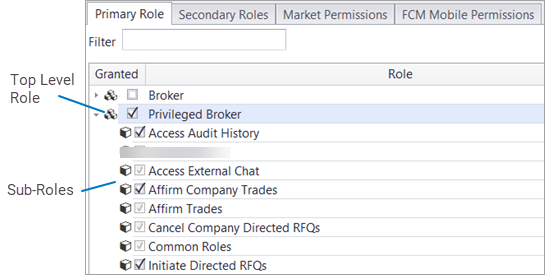
Roles permission users to perform certain trading and account functions. Sub-roles offer a subset of permissions when a top-level role is granted. For example, after a user is permissioned as a Privileged Broker, that user can then be granted specific Privileged Broker permissions (e.g. Cancel Company Orders).
Primary Roles apply specifically to a Trader, Broker, or Administrator, while Secondary Roles may apply to any Primary Role.
"Manage" roles (e.g. Manage Globex Orders) does not automatically enable "View" role permissions (e.g. View Globex Orders). The "View" role must be selected separately.
Note: Only particular sub-roles, included in top level roles assigned to a user, can be excluded manually by a Firm Administrator.
- To manage user roles:
- From the Manage Users window, select the Primary Role tab.
- In the Granted column, check one or more top level roles.
- To display sub-roles, click the arrow to the left of a top level role.
- Select any number of sub-roles as needed.
Note: Non-editable sub-roles will be grayed out.
Note: Use the Filter field to locate specific roles.
Non-editable sub-roles will be grayed out and enabled by default. These non-editable roles vary depending on the top level role currently selected. For example, select Privileged Broker and specific sub-roles for that role become non-editable, while all sub-roles for other top-level roles remain editable.
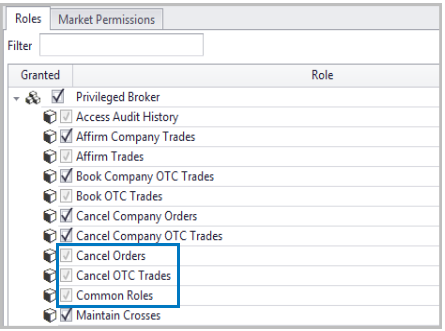
- To exclude a role or sub-role, uncheck the field, and click OK.
Administrators can choose from the following Roles:
Note: Users with regular roles, who are not in a desk, will not have access to desk functionality and can only view/manage their own orders and trades.
Broker-specific Primary Roles
| Role | Description |
|---|---|
|
Broker |
Basic interactive broker role that allows a user to enter orders and trades, manage their own and desk orders and trades, view their own and desk trades and fills, see market data, send RFQs and provides read-only access to CMED Excel Add-In. |
|
Broker Administrator |
Administrative role that allows an Admin to perform standard Broker functions, while providing permissions to cancel orders and trades, manage OTC orders and trades, generate an audit trail, maintain account assignments and configurations, manage a company's trading limits and a desk's broker fees. |
|
Privileged Broker |
Advanced broker role that allows a user to enter orders, manage their own and company orders, view all orders and trades entered by other users within a company, see market data, send RFQs and provides read-only access to CMED Excel Add-In. |
|
Privileged Broker Administrator |
Advanced Administrative role that allows an Admin to perform Broker Administrator functions, while providing permissions to assign Broker roles to users, cancel company-specific orders, maintain users logins, and manage shared groups. |
|
Privileged Read Only Broker |
Advanced read only broker role that allows a user to view (but not enter or manage) company orders, view company trades entered by other users within a company, see market data and provides read-only access to CMED Excel Add-In. |
|
Read Only Broker |
Basic read-only broker role that allows a user to see market data and provides read-only access to CMED Excel Add-In. |
Trader-specific Primary Roles
| Role | Description |
|---|---|
|
Trader |
Basic interactive trader role that allows a user to enter orders and trades, manage their own and desk orders and trades, view their own and desk trades and fills, see market data, send RFQs and provides read-only access to CMED Excel Add-In. |
|
Trader Administrator |
Administrative role that allows an Admin to perform standard Trader functions, while providing permissions to book OTC trades, cancel desk orders, manage account assignments and configurations, manage company trading limits, and view credit queries. |
|
Privileged Trader |
Advanced trader role that allows a user to enter orders, manage their own and company orders, view all orders and trades entered by other users within a company, see market data, send RFQs and provides read-only access to CMED Excel Add-In. |
|
Privileged Trader Administrator |
Advanced Administrative role that allows an Admin to perform Trader Administrator functions, while providing permissions to assign trader roles, cancel company orders and OTC trades, maintain users and user logins, manage shared groups, and view company broker fees, orders, and OTC trades. |
|
Privileged Read Only Trader |
Advanced read only trader role that allows a user to view (but not enter or manage) company orders, view company trades entered by other users within a company, see market data and provides read-only access to CMED Excel Add-In. |
|
Read Only Trader |
Basic read-only trader role that allows a user to see market data and provides read-only access to CMED Excel Add-In. |
Secondary Roles
Secondary Roles include Managing Automated Orders (Timed and Price Contingent orders), which are enabled per user by a Firm Admin.
| Role | Description |
|---|---|
|
Cancel Mobile Orders |
Allows a user to cancel orders entered via CME Direct Trading application when logged in to CME Direct Mobile. |
|
Cancel OEAPI Orders |
Required to be able to cancel orders via OE API. |
|
Clearing Member Web Admin |
Allows an admin to act as a clearing member, cancel orders, and maintain account assignments. |
|
Create UDS OEAPI |
Required to be able to submit requests via the RFQ API. |
|
Manage Auto-Hedged Orders |
Grants permission to enter and edit orders that include a hedge leg. |
|
Manage Automated Orders |
Allows uses to submit, hold, and cancel Timed and Price Contingent orders as well as manage One Cancel Other (OCO) groups. |
|
Manage Excel Orders |
Allows order management via the Excel API. |
|
Manage Mobile Orders |
Allows a user to maintain (tick up/down, hold and activate) orders entered via CME Direct Trading application when logged in to CME Direct Mobile. |
|
Manage OEAPI Orders |
Required to be able to manage orders via the OE API. |
|
Manage One Cancels Others Groups |
Allows users to manage One Cancels Others order groups using the Robot Trader. |
|
Manage Orders via Excel API |
Grants full access to create, update and cancel orders using CME Direct Excel Add-In plugin or VBA. |
|
Manage Price Contingent Orders |
Grants permission to set price contingency conditions on Futures, which hold or cancel the Future when the price moves outside the defined criteria. |
|
Manage Shared Groups |
Allows a user to create groups of contracts on the Trading Grid and make them accessible by other users within a company. |
|
Manage Synthetic Display Qty Orders |
Grants permission to enter an Automated Order type that replenishes depleted order quantity and discloses to the market a random number of lots from the total order quantity submitted. |
|
Manage Time Contingent Orders |
Allows users to manage Time Contingent Orders using Robot Trader. |
|
OE API Trader |
Allows users to create, submit, cancel, and manage orders via the OE API. |
|
Submit Mobile Orders |
Allows users to enter orders from a mobile device. |
|
Submit OEAPI Orders |
Required to be able to submit orders via the OE API. |
|
View Company Directed RFQs |
Allows a user to view Directed RFQs submitted by other users in the company. |
Administrators can choose from the following sub-level Roles:
Sub-Level Roles
| Sub-Level Role | Description | Broker | Priv Broker | Read-Only Broker | Priv Read-Only Broker | Trader | Priv Trader | Read-Only Trader | Priv Read-Only Trader |
|---|---|---|---|---|---|---|---|---|---|
|
Access Audit History |
Allows a user to query the Audit History for a specific order |
|
|
|
|
|
|
|
|
|
Act as Clearing Member |
Allows a user to log in to the Web Clearing Member view |
|
|
|
|
|
|
|
|
|
Affirm Company Trades |
Allows a user to affirm or reject trades entered by the users in their company |
|
|
|
|
|
|
|
|
|
Affirm Desk Trades |
Allows a user to affirm or reject trades entered by the users in their desk |
|
|
|
|
|
|
|
|
|
Affirm Trades |
Allows a user to affirm or reject their own trades |
|
|
|
|
|
|
|
|
|
Book Company OTC Trades |
Allows a user to enter OTC trades for other users in their company |
|
|
|
|
|
|
|
|
|
Book OTC Trades |
Allows a user to enter their own OTC trades |
|
|
|
|
|
|
|
|
|
Cancel Company Directed RFQs |
Allows a user to cancel Directed RFQ requests and responses for other users in their company |
|
|
|
|
|
|
|
|
|
Cancel Company Orders |
Allows a user to cancel orders entered by other users in the company |
|
|
|
|
|
|
|
|
|
Cancel Company OTC Trades |
Allows a user to cancel OTC trades entered by other users in the company |
|
|
|
|
|
|
|
|
|
Cancel Mobile Orders |
Allows a user to cancel orders using CMED Mobile |
|
|
|
|
|
|
|
|
|
Cancel OEAPI Orders |
Allows users to cancel orders via OE API |
|
|
|
|
|
|
|
|
|
Cancel Orders |
Allows users to cancel their own orders |
|
|
|
|
|
|
|
|
|
Cancel Orders through Web Admin |
Allows orders to be cancelled via the Web Clearing Member View |
|
|
|
|
|
|
|
|
|
Cancel OTC Trades |
Allows a user to cancel their own OTC trades |
|
|
|
|
|
|
|
|
|
CME Approved Beta Roles |
Allows users the option of monitoring auto-hedged and synthetic orders |
|
|
|
|
|
|
|
|
|
Common Roles |
The common set of roles granted to all users |
|
|
|
|
|
|
|
|
|
Create UDS OEAPI |
Allows users to submit requests via the RFQ API |
|
|
|
|
|
|
|
|
|
Initiate Directed RFQs |
Allows a user to submit Directed RFQ requests |
|
|
|
|
|
|
|
|
|
Maintain Account Assignments |
Allows a user (Clearing Member) to assign/unassign accounts from a specific user in the Web Clearing Member View |
|
|
|
|
|
|
|
|
|
Maintain Client Subscription Group |
Allows a user to receive market data subscriptions |
|
|
|
|
|
|
|
|
|
Maintain Crosses |
Allows a user to enter a CME Globex cross trade |
|
|
|
|
|
|
|
|
|
Maintain User Account Configuration |
Allows a user to set account/clearing preferences |
|
|
|
|
|
|
|
|
|
Manage Auto Hedged Orders |
Allows users to manage auto hedged orders using the robot trader |
|
|
|
|
|
|
|

|
|
Manage Automated Orders |
Allows users to enter automated orders |
|
|
|
|
|
|
|
|
|
Manage Broker Fees |
Allows a user to manage Broker Fees for OTC trades |
|
|
|
|
|
|
|
|
|
Manage Company Broker Fees |
Allows a user to manage Broker Fees for company OTC trades |
|
|
|
|
|
|
|
|
|
Manage Company Globex Orders |
Allows a user to manage CME Globex orders entered by other users in the company |
|
|
|
|
|
|
|
|
|
Manage Company OTC Orders and Trades |
Allows a user to manage OTC orders and trades entered by other users in the company |
|
|
|
|
|
|
|
|
|
Manage Contingent Timed Orders |
Allows a user to submit and manage Contingent Timed orders |
|
|
|
|
|
|
|
|
|
Manage Desk Globex Orders |
Allows a user to manage CME Globex orders entered by other users in the same desk |
|
|
|
|
|
|
|
|
|
Manage Desk Broker Fees |
Allows a user to manage Broker Fees for desk OTC trades |
|
|
|
|
|
|
|
|
|
Manage Desk OTC Orders and Trades |
Allows a user to manage OTC orders and trades entered by other users in the same desk |
|
|
|
|
|
|
|
|
|
Manage Directed RFQ Entitlements |
Allows user to manage entitlements for RFQs |
|
|
|
|
|
|
|
|
|
Manage Excel Orders |
Allows a user to manage orders via the Excel API |
|
|
|
|
|
|
|
|
|
Manage Globex Orders |
Allows users to manage their own CME Globex orders |
|
|
|
|
|
|
|
|
|
Manage Mobile Orders |
Allows a user to modify orders using CMED Mobile |
|
|
|
|
|
|
|
|
|
Manage OEAPI Orders |
Allows users to manage orders via the OE API |
|
|
|
|
|
|
|
|
|
Manage One Cancels Others Groups |
Allow users to submit, hold and cancel Time and Price Contingent orders as well as manage One Cancel Other (OCO) groups |

|
|
|
|
|
|
|
|
|
Manage OTC Orders and Trades |
Allows users to manage their OTC orders and trades |
|
|
|
|
|
|
|
|
|
Manage Price Contingent Orders |
Allows users to submit and manage Price Contingent orders. |
|
|
|
|
|
|
|
|
|
Manage Synthetic Display Qty Orders |
Allows users to enter a Qty Variation % when setting the displayed qty for automated orders |
|
|
|
|
|
|
|
|
|
Manage Time Contingent Orders |
Allows a user to submit and manage Timed Contingent orders. |
|
|
|
|
|
|
|
|
|
Moderate Directed RFQ Company Groups |
Allows users to maintain Directed RFQ Company Groups that they are a member of |
|
|
|
|
|
|
||
|
Respond to Directed RFQs |
Allows a user to respond to a Directed RFQ request with a quote |
|
|
|
|
|
|
|
|
|
Submit Globex Orders |
Allows a user to submit CME Globex orders |
|
|
|
|
|
|
|
|
|
Submit Mobile Orders |
Allows a user to enter orders using CMED Mobile |
|
|
|
|
|
|
|
|
|
Submit OEAPI Orders |
Allows users to submit orders via the OE API |
|
|
|
|
|
|
|
|
|
Submit OTC Orders |
Allows a user to submit OTC Orders |
|
|
|
|
|
|
|
|
|
Submit RFQs |
Allows a user to submit an RFQ or UDS |
|
|
|
|
|
|
|
|
|
Synchronize Trades with Clearing |
Allows a user to synchronize existing OTC trades with clearing |
|
|
|
|
|
|
|
|
|
Use Excel API |
Allows a user to use Excel API exposed by the Trading Client |
|
|
|
|
|
|
|
|
|
View Broker Fees |
Allows a user to view Broker Fees on OTC trades |
|
|
|
|
|
|
|
|
|
View Company Broker Fees |
Allows a user to view Broker Fees on OTC trades entered by other users in the company |
|
|
|
|
|
|
|
|
|
View Company Directed RFQs |
Allows a user to view Directed RFQs submitted by other users in the company |
|
|
|
|
|
|
|
|
|
View Company Globex Orders |
Allows a user to view CME Globex orders entered by other users in the company |
|
|
|
|
|
|
|
|
|
View Company OTC Trades |
Allows a user to view OTC trades entered by other users in the company |
|
|
|
|
|
|
|
|
|
View Credit Query |
Allows a user to run a credit query for their account |
|
|
|
|
|
|
|
|
|
View Crosses |
Allows a user to view Globex Cross trades |
|
|
|
|
|
|
|
|
|
View Desk Broker Fees |
Allows a user to view Broker Fees on OTC trades entered by other users in the same desk |
|
|
|
|
|
|
|
|
|
View Desk Globex Orders |
Allows a user to view Globex orders entered by other users in the desk |
|
|
|
|
|
|
|
|
|
View Desk Trades |
Allows a user to view OTC trades entered by other users in the desk |
|
|
|
|
|
|
|
|
|
View Exchange Fills |
Allows a user to view CME Globex fills |
|
|
|
|
|
|
|
|
|
View Globex Orders |
Allows users to view their own CME Globex orders |
|
|
|
|
|
|
|
|
|
View Market Activity |
Allows a user to view Market Activity |
|
|
|
|
|
|
|
|
|
View Market Data |
Allows a user to view Market Data |
|
|
|
|
|
|
|
|
|
View Org Unit Trading Limit Profile |
Allows a user to view company's trading limit profiles |
|
|
|
|
|
|
|
|
|
View OTC Orders and Trades |
Provides the ability to view OTC orders and trades |
|
|
|
|
|
|
|
|
|
View Price History |
Allows a user to view price data in the Price History view |
|
|
|
|
|
|
|
|
|
View Shadow Price |
Allows a user to see view shadow prices on an OTC trading grid |
|
|
|
|
|
|
|
|


