User Help System
CME Globex Credit Controls (GC2)
The CME Globex Credit Controls (GC2) function provides pre-execution risk controls for Clearing Firm or Partner Exchange Clearing Firm risk administrators to set exposure and maximum quantity limits for CME Globex order and trade activity cleared by CME Clearing.
Clearing firm or partner exchange clearing firm risk administrators can choose from actions to occur if limits are breached, including e-mail notifications, order blocking, and order cancellation. Real-time alerts are available to monitor
Risk limits management can be set for Legal Clearing Entity (LCE) and Execution Firm ID / Exchange groupings. Predefined groups appear with associated credit control settings in a user selected tab.
GC2 Functions
For a LCE and Execution Firm, authorized GC2 Risk administrators can manage risk settings and limits as described below:
- Select a LCE and Execution firm to manage for a given exchange
- Credit Controls Management
- Exposure Limit - manage futures and options exposure limits
- Weekday (required)
- Weekend (optional) - The default value is 0 (zero). Clients that want to trade eligible swap-based event contracts and cryptocurrency futures and options over the weekend must (1)enable weekend trading prior to (2) specifying weekend exposure limits.
- Maximum Quantity Limits - (optional) manage maximum order submission and position limits
- Notifications
- Positions
- Credit Control Alerts
See additional information for cryptocurrency and event contract swaps; including operational guidelines and limits management.
Credit Controls Management
The following information describes available GC2 settings.
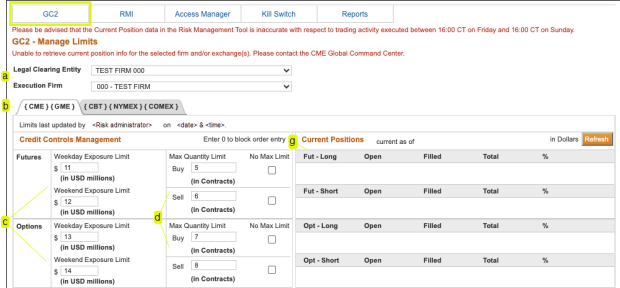
- Select the Legal Clearing Entity / Execution Firm to manage.
- Exchange Groups (optional): Newly added exchanges will have a “0” exposure limit and appear in a separate tab. This means that the firm is blocked from the newly added exchanges.
Authorized users can re-group / modify existing exchange groupings or set up a new group. Requested exchange group updates will be effective at the next Sunday start‐up.
Note: A confirmation message appears; including the last update - risk administrator, date and time.
Credit Controls Management: Using the Credit Controls Management function, GC2 Risk Administrators can enable trading and manage executing firm risk settings.
Available risk settings include futures and options Exposure and (optional) Max Quantity limits for each exchange group.
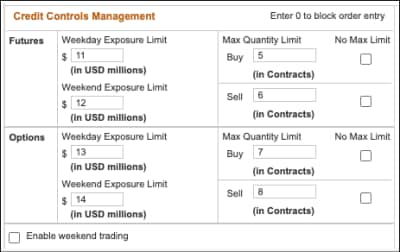
- Exposure Limits: This feature is available for authorized clearing firm risk administrators to specify real-time trade and position exposure limits at the execution firm(s) / exchange group level.
Newly created execution firms will have a “0” exposure limit, which means that the firm is blocked; default weekend exposure limits is "0".
To enable trading, the risk administrator must specify exposure limits (in USD millions, minimum $0.5, increments of $0.1) and (if applicable). To enable weekend trading, see Weekend exposure limit instructions.
Spread orders that have both Buy and Sell sides will apply a spread adjustment factor (10%) to working orders, which may affect trading limits for new orders.
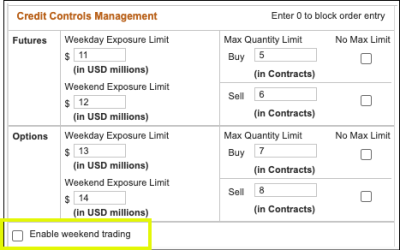
- Weekday exposure limit: Specify weekday futures and options exposure and max quantity limits for the period between Sunday at 4:05 p.m. through Friday, 5:30 p.m. CT.
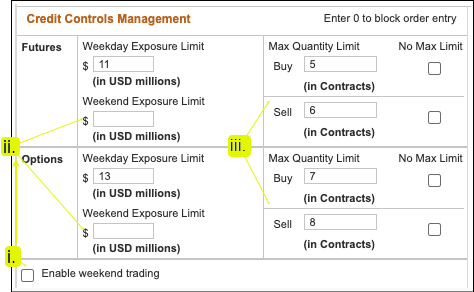
- Weekend exposure limit: By default, weekend trading is not enabled. To enable weekend trading, select (i.) the Enable Weekend Trading checkbox then specify (ii. - required ) futures and options exposure and (optional) quantity limits.
Exposure Limits and Utilization Schedule - Orders and trades are evaluated against limits and utilization in real-time according to the following schedule:
Weekdays
- Weekday session limits are effective Sunday at 4:05 p.m. through Friday 5:30 p.m.
- Orders and trades during weekdays and continuing from Friday 4:00 p.m. through Friday 5:30 p.m. apply to weekday utilization.
Weekend
- Weekend session limits are effective from Friday 5:30 p.m. through Sunday at 4:05 p.m. CT.
- Orders during this period apply to weekend utilization, which resets to zero (0) on Friday at 4:00 p.m. prior to the weekday-to-weekend schedule transition.
- Max Quantity Limits - The optional futures and options Max Quantity Limit for a LCE and execution firm for an exchange group for the weekday and weekend session.
- No Max Limit: When selected, all orders are evaluated against CME Group specified product limits and available credit.
To enter / update Max Quantity Limits, uncheck the No Max Limit checkbox, enter a maximum quantity limit (buy and sell side), then Save.
Note: If both weekday/weekend Exposure Limits and Max Quantity Limits are set, the most conservative value is used.
See also: Time frame for changes - summarizes when CME Globex Credit Controls (GC2) updates are effective.
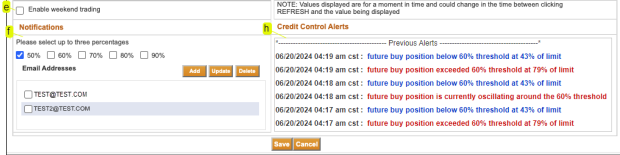
- Enable Weekend Trading: By default, weekend trading is not enabled. Selecting this option will notify CME Group of ability to participate in weekend trading.
To enable access and apply the specified weekend exposure limits, select this checkbox prior to entering weekend exposure limits.
Note: Unchecking / deselecting this checkbox will set weekend exposure limits to zero (0).
- Notifications: The notification panel is used to specify when to notify individuals when the percentage of exposure limits are reached.
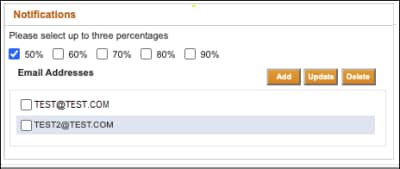
To set up notifications, select up to three notification levels 
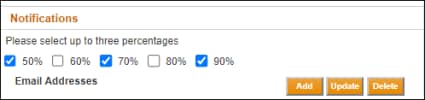 , then Add
 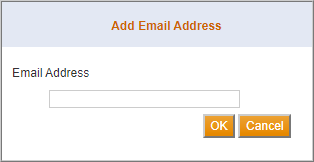 recipient email address(es).
To finalize, select OK, then Save.
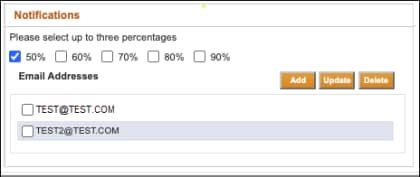
Note: At least one email address must be entered per Executing Firm ID / Exchange group.
Additional options:
- Update - Select the checkbox for the email to update, select Update, modify the address, confirm by selecting OK then Save.
- Delete - Select the checkbox for the email to delete, select Delete, confirm by selecting OK then Save.
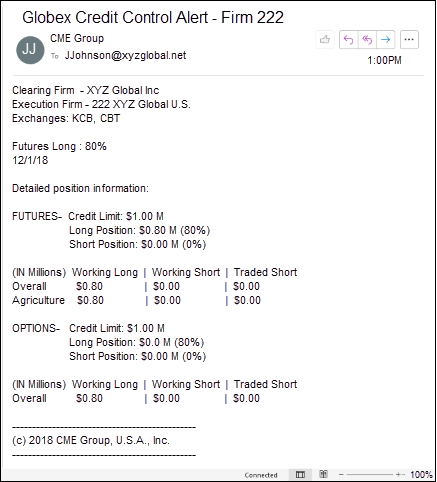
- Example email notification
- Current Positions: Open and filled positions are dynamic calculations of product complexes for the select Executing Firm ID / Exchange group.
To update the Current Positions details, select Refresh .
- Total Futures Long (Fut - Long) = Sum of all weighted quantity open long futures orders + Sum of all weighted long fills - Sum of all weighted short fills.
- Total Futures Short (Fut - Short) = Sum of all weighted quantity open short futures orders + Sum of all weighted short fills – Sum of all weighted long fills.
- Total Options Long(Opt - Long) = Sum of all weighted quantity open long options orders + Sum of all weighted long fills – Sum of all weighted short fills.
- Total Options Short (Opt - Short) = Sum of all weighted quantity open short options orders + Sum of all weighted short fills – Sum of all weighted long fills.
For additional information, see: Position Calculations
Time Frame for Changes
The following table summarizes when CME Globex Credit Controls (GC2) updates are effective.
- Clearing firms have the ability to apply exposure limits to Executing Firm IDs created on or transferred mid-week. Limits are applied by 4:45 CT.
- Filled positions are not carried over between trading days and are reset to zero at 4:30 Central time (CT).
- Basis Trade at Cash Open (TACO) products operate on unique contract terms and trading schedule.
After trade execution (fill), positions are reset as specified in the Client Systems Wiki - Basis Trade at Cash Open.
| Type of Change | Realtime | 16:30-16:45 (4:30 p.m. - 4:45 p.m. CT) Monday through Friday or upon Sunday start-up | Next Sunday Start-up |
|---|---|---|---|
|
Weekday Exposure Limits |
X |
|
|
|
Weekend Exposure Limits |
X |
|
|
|
Enable Weekend Trading |
X |
|
|
|
Max Quantity Limits |
X |
|
|
|
Executing Firm ID / Exchange Regrouping |
|
|
X |
|
New Firms |
|
X |
|
|
Clearing Mapping Relationships |
|
X |
|


