User Help System
Modify a Group
- To modify a group:
- Drag the exchange button to a different group. In this example, CBT was moved to the second group.
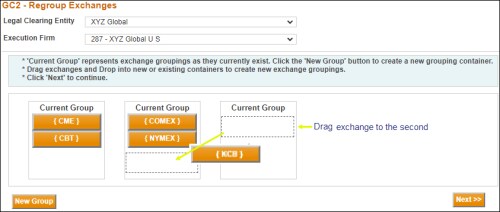
- Select Next when all exchanges have been moved to the correct group(s).
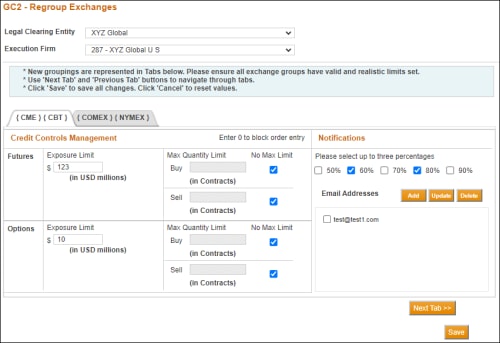
- Verify or modify the following for the Current Group:
- Exposure Limits for Futures and Options
- Max Quantity Limit Buy and Sell for Futures and Options.
- Notification Percentages
- Email Addresses for Notifications
- To modify additional exchange groupings, select Next Tab.
- Verify or modify the following for the Current Group:
- Exposure Limits for Futures and Options
- Max Quantity Limit Buy and Sell for Futures and Options
- Notification Percentages
- Email Addresses for Notifications
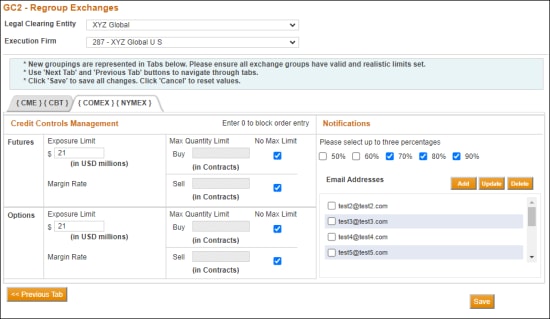
Note: On Exchange tabs, All Execution Firms must have Exposure Limits.
Although not required, Max Quantity Limits can be set additionally.
- Select Add in the Email Addresses area and enter the email address.
- Select Save when finished.
GC2 displays a message that the modifications were successfully made.
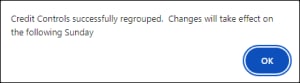
- Select OK.
- Select OK on the GC2 window.
The following message displays.
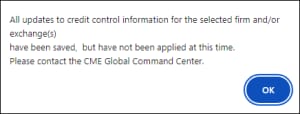
- Select OK to respond to this message.
Note: Select Cancel to revert to the previous settings.


