User Help System
Set Up a New Group
The following instructions illustrate the process to group exchanges in a tab to manage associated execution firms settings; limits / notifications when a limit is reached.
- To set up a new group:
- Navigate to the Regroup Exchanges window.
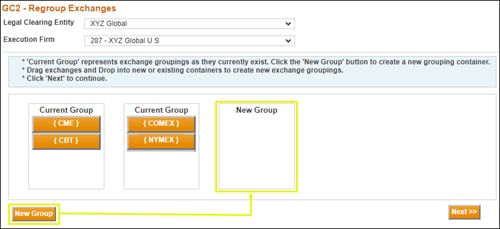
- Select the New Group button at the bottom of the window.
A new panel appears to the right of the current group.
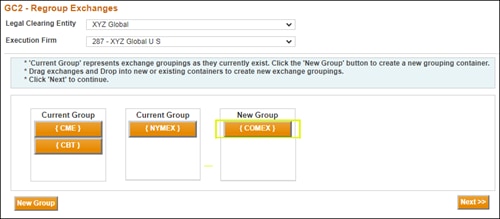
- Drag the appropriate exchanges from the Current Group to the New Group. In this example, COMEX was moved to the New Group.
- Select the Next button.
- Verify or modify the following for the Current Group:
- Exposure Limits for Futures and Options
- Max Quantity Limit Buy and Sell for Futures and Options
- Notification Percentages
- Email Addresses for Notifications
- Select the Next button when finished.
- Enter the following for the New Group:
- Exposure Limits for Futures and Options
- Max Quantity Limit Buy and Sell for Futures and Options
- Notification Percentages
- Email Addresses for Notifications
Note :Exposure Limits and/or Max Quantity Limits are required.
In addition
at least one email address must be entered
for the notification alerts.
- Select Save when finished or select Cancel to revert to the existing group settings.
GC2 displays a message that the modifications were successfully made.
- Select OK to respond to this message.
- Select Next Tab when finished.


