User Help System
Personally Identifiable Information (PII)
Pursuant to the EU and UK MiFID frameworks, CME Group Cash Markets trading venue operators (BrokerTec Europe Limited and CME Amsterdam B.V.) are required to identify participant firms [Globex Firm ID (GUS)], their natural person users [Globex User Signature (GUS), including Short Code and PII data] and trading algorithms for regulatory reporting and record keeping purposes.
To be allowed to trade BrokerTec and EBS CME Cash Markets MiFID Products, (‘MiFID Regulated Products’), participant firms must submit the required PII data for manual traders and individuals who are operating algorithm trading systems.
Failure to submit PII data will result in GUS traders not being allowed to trade. The PII data is linked to the short code associated with a Globex User Signature (GUS) ID (or authorised trader).
The Request Center (ESS) Personally Identifiable Information (PII) function includes the following functions for an authorized PII manager to submit required information for record-keeping and reporting obligations.
- Assigning PII Manager Entitlements - Performed by an authorized entity Admin Manager
- PII Summary Function - Select a Legal Entity Identifier (LEI) to view and provide required identification information for a GUS/Trader.
- File Upload - Upload up to 500 GUS/Trader users' PII information with a formatted Comma Separated Value (CSV) file.
- My Requests (ESS) - Request Status: View the processing status of previous submissions.
Prior to using the PII function ensure the following:
- Entity Admin Manager and PII manager have reviewed the CME Group PII Data Submission User Guide, which outlines regulatory requirements and reporting obligations.
Refer to the below referenced user guide sections:
- PII data required (section 3), lists required data and accepted national client identifiers by country.
- An overview of the data submission (section 4.3.1) and upload process (section 4.3.2)
- Data handling and participant's rights (section 5)
- A Globex Firm ID (GFID) and associated Globex User Signature (GUS, section 4.2) is created / available, assigned at least one (BrokerTec / EBS) MiFID regulated product and the required Short Code.
- Prior to using this function the Admin Manager must assign the Request Center - PII Manager entitlement (section 4.1.1) to authorized PII Manager user(s).
- The PII manager will enter (individual PII) or upload (multiple PII) and ID information for the person associated with the GUS.
Assigning PII Manager Entitlement
The following instructions describe the process for an Admin Manager to access the User Administration function to assign the PII manager role to the user that will submit PII information. Prior to performing this process ensure the PII manager has a CME Group Login with multi-factor authentication.
- To assign the PII Manager entitlement:
- From the CME Customer Center menu, select Administration > User Administration.

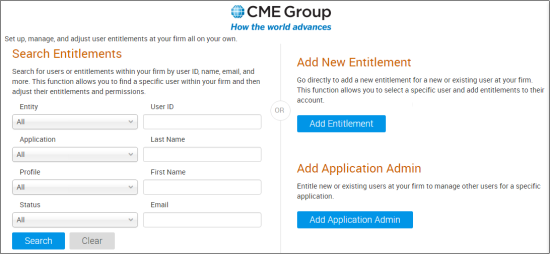
- On the Add Entitlement page, specify the entitlements:
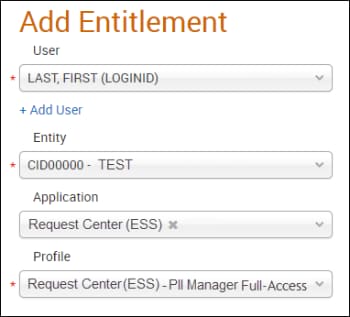
- Select the User (Name or CME Group Login)
- Entity: Select the registered entity (automatically selected for users / administrators with permissions for only one entity).
- Application: Request Center (ESS)
- Profile: Request Center (ESS) - PII Manager Full-Access
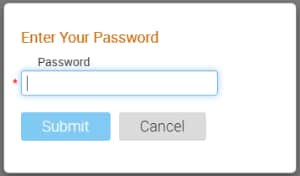
- After specifying entitlement and application details, select Add Entitlement and confirm by entering your CME Group Login password, then click Submit.
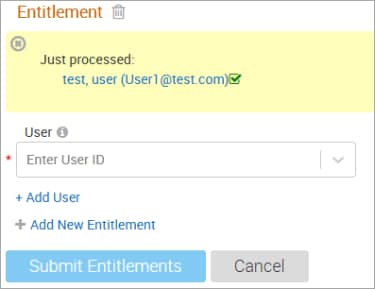
The user profile page and confirmation appears and an email is sent to the Admin Manager(s) and added user(s).