User Help System
Getting Started
The AutoCert+ tool is an automated testing tool for validating application functionality. It provides an easy-to-use web interface for walking through CME Group certification scenarios.
To facilitate the process of connecting a customer application, CME Group provides a dedicated certification environment to allow customers to test their systems before they complete certification.
This Help system accompanies the AutoCert+ BrokerTec Chicago Market Data TCP test suite. This is a supplemental test suite for certifying the higher precision price feed available over Premium and Conflated TCP channels.
- To run and navigate AutoCert+:
- Complete the steps detailed in the "Process Summary: BrokerTec New Release Testing Setup" topic.
- Log into the automated certification tool.
- Review general AutoCert+ test suite navigation and general interview information.
- Navigate to the AutoCert+ BrokerTec Chicago Market Data TCP test suite.
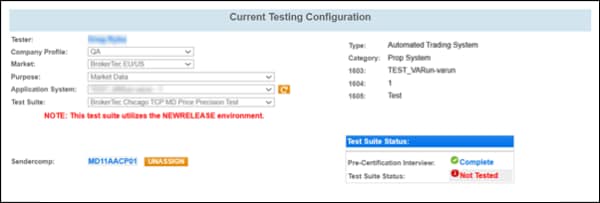
- Select a Company Name.
- Select a Company Profile.
- For Market, select BrokerTec (EU/US).
- For Purpose, select Market Data.
- Select an Application System. Use the refresh (
 ) button to update the list to include recently created Application Systems.
- For Test Suite, select BrokerTec TCP MD Price Precision Test .
- Complete the Interview for this test suite.
- Complete applicable test cases in the Test Suite.
- Complete the certification process from the Post Certification tab.


