User Help System
Getting Started
The AutoCert+ tool is an automated testing tool for validating application functionality. It provides an easy-to-use web interface for walking through CME Group certification scenarios.
To facilitate the process of connecting a customer application, CME Group provides a dedicated certification environment to allow customers to test their systems before they complete certification.
Certification session details will be assigned and forwarded to the customer, including certification target locations and firm / user Identifiers.
This Help system accompanies the AutoCert+ EBS Direct 2.0 - Taker API test suite.
For the initial EBS Direct Taker API certification period:
- AutoCert+ test cases will appear in read-only format.
- To complete Interview responses and Tests, users must contact Certification Support for Electronic Trading (CSET)
- To run and navigate AutoCert+:
- Log into the automated certification tool.
- Review general AutoCert+ test suite navigation and general interview information.
- Navigate to the AutoCert+ EBS Direct 2.0 - Taker API test suite.
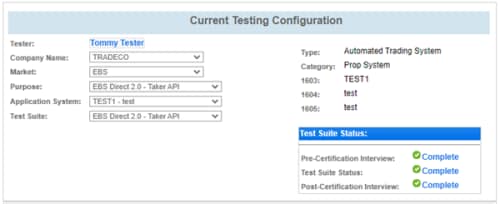
- Select a Company Name.
- For Market, select EBS.
- For Purpose, select EBS Direct 2.0 - Taker API.
- Select an Application System. Use the refresh (
 ) button to update the list to include recently created Application Systems.
 - For Test Suite, select EBS Direct 2.0 - Taker API.
- (if applicable) Select a Identifier and select ASSIGN.
- Complete the Interview for this test suite.
Available test cases are determined by interview question responses.
- Complete applicable test cases.
- Complete the certification process from the Post Certification tab.


