User Help System
Login and Logout of FADB
Firm Administrator Dashboard uses CME Group Login to manage application authentication. This is a self-managed, centralized user profile service that authenticates access to CME Group applications and services.
Prior to logging in, users should ensure the registration procedures are completed.
Note: For issues logging in, contact Enterprise Application & Systems Entitlements (EASE).
- To login to FADB:
- Navigate to the CME Group Login page.
- If you are not logged in, enter login credentials and select Log In.
- Authenticate your ID:
Via Duo.
OR
Enter the code that was sent to your mobile device or voice code from an automated call to your primary phone number (US only).
- From the CME Customer Center menu, select Administration > Firm Admin Dashboard.
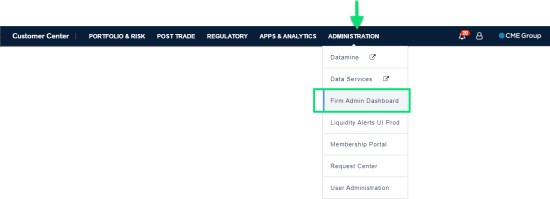
Note: For additional information about creating or managing a CME Group Login, or using multi-factor authentication, please review the CME Group Login User Help System.
- To close the FADB application:
- Complete any and all current tasks in FADB.
- Select the X of the Firm Admin Dashboard application tab.
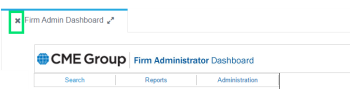
- To log out of all CME Group applications :
Select My Profile > Logout.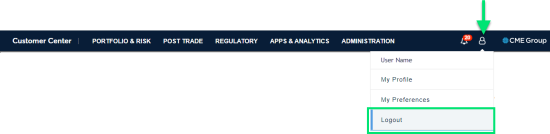
Contact Information
For questions regarding this and other CME applications, please refer to the Contact Information directory on CME Group's Client Systems Wiki .


