User Help System
Logging In
After confirming CME Group Login registration and association with an authorized firm, review the following login instructions.
CME Group Login
CME Group Login is a self-managed, centralized user profile service that authenticates access to Entity Risk Management and other applications and services.
- Create a new CME Group Login user ID and profile: Prior to accessing, all users must have an active login profile.
- Review the CME Group Login User Guide: Access guidance and instructions: register, retrieve forgotten user ID, reset password, update profile and manage other services.
- Update a CME Group Login User ID and profile: Login privileges are retained even if users change firms, email address, registration information, User ID or password. Some instances may require access and entitlements update.
For additional registration or login assistance, including forgotten user ID and password, contact EASE.
To request application access, contact Global Account Management.
Log In
- To login to Entity Risk Management:
- Navigate to cmegroup.com., select the Login / Profile icon (
 ), then select CME Customer Center (single sign on).
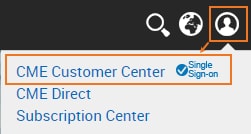
- On the page that appears, enter the CME Group Login ID and Password, then select Login .
Note: To register for a CME Group Login ID, view CME Group Login Registration.
- From the Portfolio & Risk tab, select Entity Risk Management.

Note: For login or access issues, contact Enterprise Application & System Entitlements (EASE) or go to the CME Group Login page.


