User Help System
Logging In
EFS uses CME Group Login to manage application authentication. CME Group login is a self-managed, centralized user profile service that authenticates access to CME Group applications and services.
CME Group Login offers the following benefits:
- Access to all integrated systems, to which the user ID has assigned privileges, with one user ID and password.
- A single user ID with permissions for multiple firms, when appropriate.
- A personally chosen user ID that is retained by the user even when changing employers or firm relationships.
- The ability to self-manage passwords and update profiles online.
- Access to other integrated applications via a common navigation menu.
- To register for a CME Group Login:
For registration instructions, refer to the CME Group login webhelp / user manual.
- To log in to EFS:
- To access the EFS application, open an internet browser and navigate to the following address: https://efs.cmegroup.com.
The CME Group login page appears.
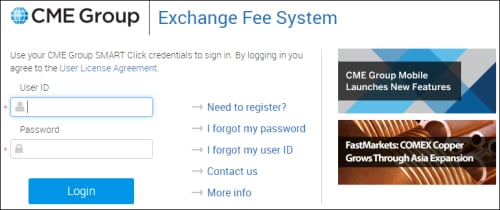
- Enter the User ID and Password, then click Login.
NOTE: If you do not have a CME Group Login, refer to the registration instructions. For issues accessing your CME Group Login contact: Enterprise Application & System Entitlements (EASE). For EFS issues, refer to the support contacts.
Upon successful login, the EFS Homepage appears.
Help
To display the EFS Webhelp / User Manual, click the application Help link.

Support Contacts
For registration issues or problems accessing EFS contact Enterprise Application & System Entitlements (EASE).
To obtain contact information for the Exchange Fee System support team, browse to the EFS homepage.
- For EFS support and troubleshooting, refer to the Fee Hotline.
- For CME connection or user access inquiries, contact General Customer support.
- Email EFSAdmin@cmegroup.com.


