User Help System
FX Spot + Card
The FX Spot+ Card, FX Spot Market Card, Metals Market Card, and NDF Market Card are optimized for professional foreign exchange spot trading on the EBS Market Central Limit Order Book. CME FX Spot Plus (CME FX Spot+) a new tradable spot FX instrument, leveraging CME FX Link liquidity to bring together OTC spot FX and FX futures.
CME FX Spot+ enables spot FX market participants to tap into CME FX futures liquidity through an open, transparent central limit order book while giving FX futures users broader access to OTC liquidity. This unique liquidity connection is made possible by implied matching through CME FX Link, a liquid, tradable spread between OTC spot FX and FX futures.
The FX Spot+ products are available for the following currency pairs: EUR/USD, GBP/USD, AUD/USD, NZD/USD, USD/JPY, USD/CAD, USD/CHF, and USD/MXN
Displayed prices may be from multiple counterparties, but the number of counterparties participating in a price is not displayed. The active Price panel has a yellow background and using trading keys of EBS Keypad will result in trading action from Active panel (see Orders section). A white background indicates that the panel is not active.
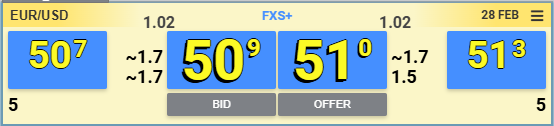
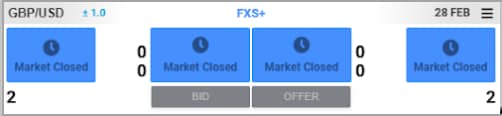
Note: FXS+ is available for trading only while CME Futures market for the related instrument is also open. While futures markets remain closed FXS+ cannot be submitted and no prices will be visible. A "Market Closed" message will be displayed on the FXS+ Price Card.
Price Tiles
Use price tiles to view Dealable prices and trade on them.
Each price card has four spot price buttons. For each side of the market (Bid and Offer):
- Inner prices display Best Dealable Prices
- Outer Price display limit price for:
- specific Amount as configured by the user
- specific price range away from Dealable Best as configured by the user (inventory indicator underneath will display available amount at that range)
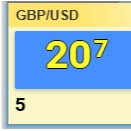
Best Dealable Prices
The spot price contains the following elements:
The Big Figure represents the first few digits in the price of an instrument based on historical market conventions
- For Bid - displayed in smaller font next to the upper left corner of the inner price tiles
- For Offer - displayed in smaller font next to the upper right corner of the inner price tiles
Pips:
- Pips represent more granular portion of the price based on historical market conventions for each instrument. Some instrument may have fractional pips at the end: e.g. half-pip, quarter of a pip, tenth of a pip.
- Pips display in an outlined yellow digits with shadow
- Traders own price displays in flat white digits (no shadow)
- Fractional pip (when it exists) displays in a small font located on the top right corner of the button
Note: Fractional pips may be hidden from display by selecting the Rounded: Whole Pip option in User Preferences > Market Card – Price Display Options.
Top of Book Inventory
Top of Book inventory indicators displayed to the sides of each of price tiles represent inventory expressed in millions available at the best dealable price. Display of the 2nd level can be disabled from User Settings.
Exact or Cumulative Amount
ToB Inventory displays as either an Exact or Cumulative amount.
Exact Amount
- Displays the liquidity available for at the Best Dealable price level
- When enabled 2nd inventory level displayed below primary ToB inventory indicator displays liquidity at the price level directly adjusted to top of book. 2nd level inventory value can be 0 if no liquidity exists at that price level.
- Lower Liquidity value displays the exact liquidity available for a price level which is 1 min increment away (pairs trading in halves - a half pip away, pairs trading in whole pip - 1 pip away)

Cumulative Amount
Cumulative Amount Inventory Display can be enabled for pairs which have fractional pips (halfs, tens). Visual indication for the "Cumulative Amount" configuration is visible: blue triangles pointing out towards each value.
- displays the aggregated liquidity from ToB price level the next whole pip price
- When enabled in Cumulative Amount mode 2nd inventory level displayed below primary ToB inventory indicator displays liquidity from nearest full pip to the top of book price to the next full pip.
Outside Prices
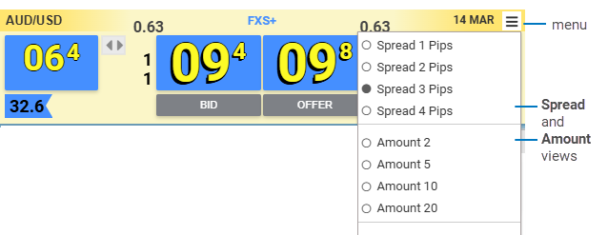
Use the menu button on the market card to change the views.
Amount View
- Select an Amount View from the menu.
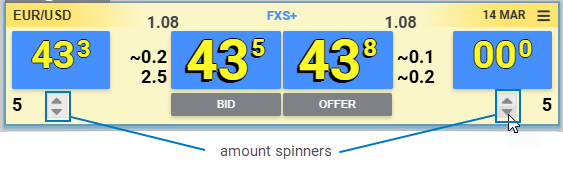
- Hover over the Active price card to display the Amount spinners. Use the spinners to change the Amount views for the nearest Reg spot price. The displayed Reg price represents the price level in which the Amount can be satisfied.
Spread View
- Select a Spread View from the menu.
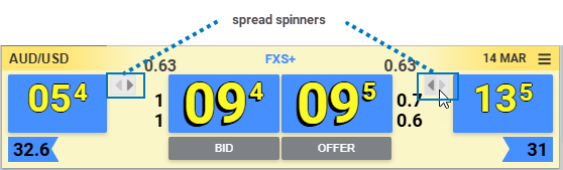
- Hover over the Active price card to display the Spread spinners. Use the spinners to change the spread view for the nearest Reg spot price. The displayed inventory represents the accumulated available amount from ToB price.
Value Date
Located on the left side of the menu button, the Value Date identifies the settlement date associated with today's trading for the currency pair.
Note: To enable, manage, or disable Market Card Slippage settings, refer to Slippage Switch and Slippage Preferences. If trading NDF, Metals, and eFix refer to NDF Market Card, Metals Market Card, and eFix Card.
Inverted Pair Indicator
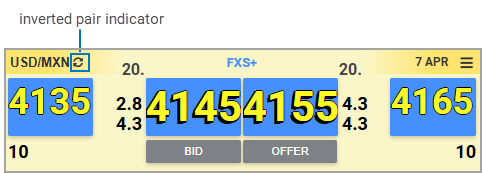
A circular arrow next to pair signifies that this pair is inverted in futures markets (i.e. MXN/USD in Futures, but USD/MXN in SPOT). For such pairs fill amount may potentially be down to dollar value as a result of converting futures prices and orders into FX Spot prices and orders.
The FX Spot + card contains the following elements:
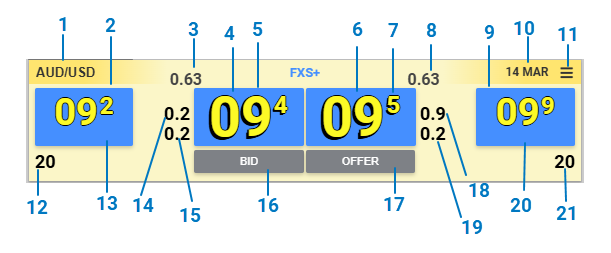
| Number | Description |
|---|---|
| 1 | Currency Pairs selection |
| 2 | Reg Bid spot price button (outside Bid button) |
| 3 | Best Dealable Bid spot price label big fig |
| 4 | Best Dealable Bid spot price button (inside Bid button) |
| 5 | Best Dealable Bid spot price label pips |
| 6 | Best Dealable Offer spot price label pips |
| 7 | Best Dealable Offer spot price button (inside Offer button) |
| 8 | Best Dealable Offer spot price label big fig |
| 9 | Reg Offer spot price button (outside spot button) |
| 10 | Value date label |
| 11 | Menu button |
| 12 | Amount View Bid size indicator |
| 13 | Reg Bid spot price label pips |
| 14 | Aggregated Bid Liquidity for ToB to next whole pip |
| 15 | Aggregated Bid Liquidity for 1 pip away from ToB next whole pip |
| 16 | BID button – triggers a BID form |
| 17 | OFFER button – triggers an OFFER form |
| 18 | Aggregated Offer Liquidity for 1 pip away from ToB next whole pip |
| 19 | Aggregated Offer Liquidity for ToB to next whole pip |
| 20 | Reg Offer spot price label pips |
| 21 | Amount View Offer size indicator |


