User Help System
Getting Started
CME Platform provides commissioned Brokers, Traders, and Asset Managers with an interface where global OTC market transactions are entered for matching and processing by the CME Group clearinghouse. CME Platform allows for the submission of off-exchange OTC derivatives transactions that CME Group has designated as eligible for clearing only. Transactions are subject to the CME Group rule book applicable to clearing-only products.
Participants can conduct their own transactions off-exchange, negotiate their own prices, and still take advantage of the Exchange clearinghouse by submitting the transactions through the CME ClearPort application on CME Platform, where:
- Brokers and Dual-Sided Submitters, Traders (when configured for single-sided trade entry), and Asset Managers have the ability to submit trades for clearing in real-time. When a Broker or Dual Sided-Submitter enters a trade on behalf of the account owner, trade details are entered into CME ClearPort. Once the trade is submitted, the account owners are notified.
- Traders have the ability to view their own submissions.
- Transactions entered and handled by Brokers, Dual-Sided Submitters, Traders, and Asset Managers are referred to as deals or trades.
- Deals: Pre-negotiated transactions with a broker or counterparty.
- Trades: Submitted, pre-negotiated deals that are matched, cleared, and reported to the market.
A submitted trade is checked for accuracy, then cleared.
If there are discrepancies in the information, the trade is rejected and the reason is provided in the Trade Blotter.
See also: The client systems wiki provides informational topics on the CME ClearPort API including support functions, workflows, messages, and interfaces that allow users to submit OTC trades for matching and clearing.
CME Platform Access
Authorized representatives of intended CME Platform market participants (individual, clearing firm, brokerage firm, trading firm) must complete the following to receive access to CME ClearPort application clearing services.
- Create and register a CME Group Login ID to authenticate access to CME Group applications and services.
CME Group Login is a self-managed, centralized user profile service that authenticates access to CME Group applications and services.
Note: To ensure the best security and customer experience, CME ClearPort application users are encouraged to use a supported browser.
- Complete and submit the CME ClearPort Services Registration.
Users will receive notification when access is authorized.
- Use the Account Management Service to create and activate accounts to use ClearPort; including market types, products, credit controls.
- To log into CME Platform:
- Enter or navigate to the following URL: https://platform.prod.cmegroup.com
Note: To access the New Release version navigate to: https://platform.uat.cmegroup.com
- On the login page, enter the User ID and Password, then select Login.
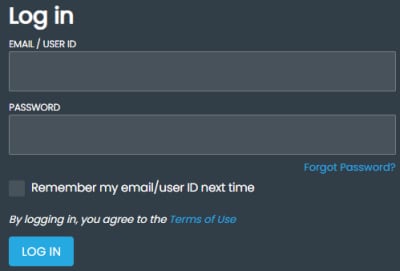
Note: After three unsuccessful logon attempts, the account is automatically locked. To obtain access to a locked account refer to the CME Group Login User Help instructions.
If necessary, enter the multi-factor access code.
- To logout:
In the upper right corner, select the Settings ( ), then Logout (
 ).
).
See also: Settings
- For login issues, contact Enterprise Application & System Entitlements (EASE), or access self-service functions on the CME Group Login webpage.
- For onboarding, application issues, or trade support, see: Registering for ClearPort.


