User Help System
Getting Started
CME Direct offers side-by-side access to CME listed Futures, Options, and OTC markets—all on one screen.
Offering electronic trading of options and futures, aggregated OTC broker markets combined with straight-through processing and straight-through clearing via CME ClearPort, CME Direct helps you work more efficiently and effectively.
Note: View additional CME Direct information here.
Logging into CME Direct
CME Direct uses CME Group Login two-factor authentication, a self-managed, centralized user profile service that authenticates access to CME Group applications and services. CME Group Login users, currently accessing CME Direct, can use their existing CME Group Login ID to also access CME Direct Mobile (once they have been assigned the proper permissions).
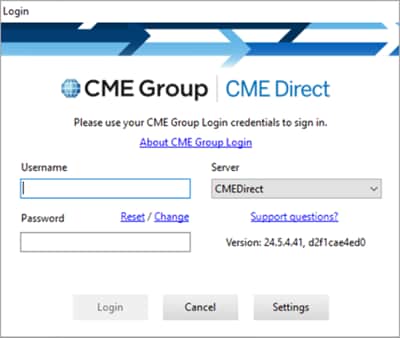
- To log in, use one of the following methods
- Enter your Username and Password in the sign in screen
OR
- Follow the instructions for Connecting with Modern Authentication (OpenID)
Change a Password
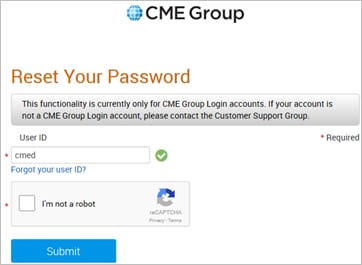
To change a password, select Menu > Change Password, and follow the instructions detailed in the CME Group Login Help.
System Requirements
CME Direct operates using Microsoft .NET technology. For optimal performance, follow these minimum recommended requirements:
- 3GHz + dual-core or higher processor. Quad-core processor preferred
- 4GB memory of greater
As announced by Microsoft, support for the Windows 7 operating system ended on Tuesday, January 14, 2020.
As of this date, CME Direct no longer offers technical support for operating system issues due to using Windows 7 or other non-supported operating systems. CME Direct continues to offer technical support on Microsoft supported Windows operating systems.
Please contact the Global Command Center (GCC) with any questions in the U.S. at +1 800 438 8616, in Europe at +44 20 7623 4747 or in Asia at +65 6532 5010.
Connection Settings
CME Direct connection settings configure automatically. You can check connectivity from Menu > Connection Settings. The Connection Settings window includes General and Proxy information that identifies your environment, server, and port.
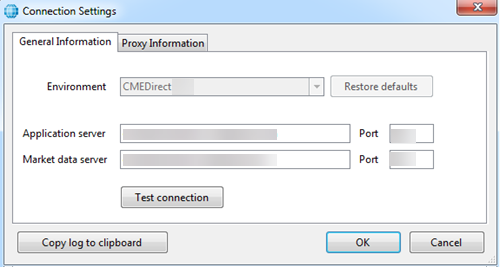
CME Direct uses a TCP connection to the Primary Application and Primary Market Data addresses.
Note: Use your CME Group Login to review CME Direct connectivity details.
It is possible your firewall may prevent a connection. Use the Test Connection button to see if your connection was successful.
 - Indicates a successful connection.
 - Indicates a failed connection.
For assistance with a failed connection, or for directions on using Proxy and DNS functionality to resolve a failed connection, contact the support staff at CMEDirectSupport@cmegroup.com.
Note: For connection issues, use the Copy Log to Clipboard feature to provide support staff with connection data.
Availability and Security
Availability: CME Direct will be available 99% of annual market hours, continuous from 4 pm Sunday through 7 pm Friday Eastern Time.
Security: All data in transit between CME Direct and CME Group clients will be encrypted with TLS 1.2 or better. All CME Direct data at rest will be encrypted.
User Roles and Permissions
CME Direct roles and markets are assigned by an Exchange Administrator. The Exchange Administrator creates markets and configures the behavior of those markets, including opening/closing times, implied markets to be created, supported order types, price warning limits, matching algorithm for the market, and so forth.
The user role determines the user privileges to CME Direct, as follows:
- Broker - authorized to log into the Trader Client application, which is configured to log into the Broker's own match engine. Brokers can view all trader and broker orders entered into their brokerage firm's matching engine. They can also "impersonate" traders and view the tradeable and non-tradeable markets on trader views, restricted to the broker's own prices.
- Broker Administrator - authorized to create trading privileges for their own broker users and trading firm customers at the trading firm level.
- Trader - authorized to log into the Trader Client application that includes a trading firm "aggregator", which logs into each Broker Matching Engine for a given product. Traders can view Order Depth and trade against prices offered by brokerage firms with which the trader's trading firm has a trading relationship.
- Trader Administrator - authorized to maintain the individual trading rights of their traders. The Trader Administrator must grant each trader a Trader role for trading specific products or groups.
Contact Information
For questions regarding this and other CME applications, please refer to the Contact Information directory on CME Group's Client Systems Wiki .


