User Help System
Registering and Managing Globex Operator IDs (Tag 50)
Operator IDs, previously known as Tag 50 IDs, identify authorized trading participants (individual or ATS operator group) that transmit messages to / from CME Globex and operate trading systems.
Registration of Globex Operator IDs are required for individual members, employees of a member, employees or contractors of a clearing or corporate member. CME Group reserves the right to require the registration of all market participants.
Globex Operator IDs must be unique at the Clearing Member (Registered Entity) and Trading firm level. Clearing member firms must ensure Globex Operator IDs are registered and correct information is maintained in the Exchange Fee System (EFS).
See also: - Exchange Fees for Clearing and Trading
- Exchange Fee System User Help
Accessing Globex Operator ID / Tag 50 Self-Service
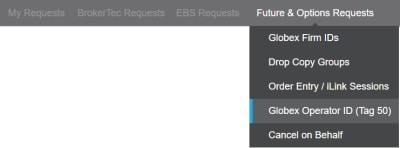
The following instructions illustrate the process to access Futures and Options - Globex Operator ID / Tag 50 IDs to view and manage market participant identifiers.
- From the CME Customer Center menu select Administration or Default > Request Center (ESS).

- From the Futures & Options Requests menu, select Globex Operator ID (Tag 50).
Authorized Users
The Request Center (ESS) includes functions for authorized Clearing Member and Trading firm users to register and manage Globex Operator IDs (previously known as Tag 50 ID).
See also: CME Globex Operator ID Requirements
Before accessing Operator ID self-service functions, ensure the following is completed:
- Self-Service Agreement: Clearing and Trading firms must have an active Self-Service agreement / form with CME Group.
- Entity Officers / Admin Managers are administrative users for their entities and related firms and assign entitlements to additional users to manage Globex Operator IDs.
Prior to viewing Globex Operator ID data and authorizing firm access, Admin Managers must also authorize themselves with application entitlements.
- Application Administrators: Can authorize clearing firm users for Request Center - Globex Operator ID / Tag 50 user entitlements.
- Clearing / Trading firm users: Users with Globex Operator ID / Tag 50 Full Access entitlements can manage Globex Operator IDs and ATS team members.
Authorized trading firm users can submit Globex Operator ID and ATS team members for clearing firm administrator review.
- Trading Firm Access: Execution / Trading firm users that want to view Operator ID details must contact their registered entity Admin Manager for entitlements to view Operator ID data. Users must also have Globex Operator ID / Tag 50 View Only access.
Globex Operator ID (Tag 50) Functions
- Access Operator ID Self-Service
- View Operator ID details
- Register Operator IDs
- Add Clearing Firm selections
- Manage trading firms access
- Manage user access to register new Operator IDs and view details of existing IDs
The following function is available to users that have been granted firm-level self-service access,

- Filter: Search by entered criteria
- Globex Operator ID (GOID)
- Exact Match
- Last / First Name
- Clearing Firm
- Associated Entity
- ATS team - Filter results to ATS teams only
- ATS Team Name - Search for ATS team names that contain entered criteria
- Sort: Sort by ascending or descending order by selecting column headings:
- Name
- Clearing firm
- Associated entity
- Registration type: ATS team, registered exchange(s)
- ATS team name
- Effective periods
- Export: Default results include active IDs only. To view expired IDs, select Export and filter options.

- Type: Excel / CSV
- Expired: View expired IDs (only) in a CSV or MS Excel file.
- Active / Expired: View active and expired IDs in a single exported CSV or MS Excel file.
- Register Globex Operator ID (GOID): Available to clearing and trading firm administrators.
- Select Operator ID / Tag 50: To view additional individual or ATS team details, select the blue linked Operator ID.
Individual

ATS Team

Operator ID Video Tutorial
View an overview video and instructions to create Operator IDs
- Granting Operator ID entitlements [Clearing Firm (C) - User Administration].
- Managing Trading Firm permissions to view a Operator ID - C - Request Center (ESS).
- Selecting Clearing Firms to manage Trading Firm (T) - Request Center (ESS).
- Registering new Operator IDs - C/T - Request Center (ESS).
- Reviewing, editing, approving Operator ID registration requests - C - Request Center (ESS).
Globex Registration on the Exchange Fee System
Additional Globex Operator ID registration and management functions are available from the CME Exchange Fee System - Globex Registration (example: editing Globex Operator ID details).
Contact Information
- To inquire about Operator ID (Tag 50) access or details, contact your clearing firm.
- For questions about access or entitlements, contact Global Account Management (GAM).
- For login / access issues, contact Enterprise Access and System Entitlements (EASE).


