User Help System
Securing Order Entry / iLink Sessions
The Request Center (ESS) includes function to manage Hash Message Authentication Codes (HMAC) for secure to iLink Order Entry and Drop Copy sessions.
Authorized users can generate private security keys or manage secure iLink Session activity.
- Client identity verification: Login is signed and validated using security credentials.
- Message confidentiality and integrity: CME Globex uses customer submitted credentials to calculate the HMAC value to validate against an order entry login request.
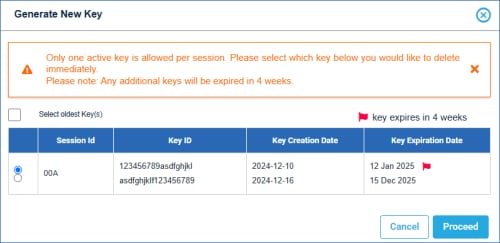
- In situations when a secure key is within four weeks of expiration, a user can have two secure key pairs.
The oldest secure key pair will expire in four weeks (at market close).
Prior to expiration, an email is sent to registered administrative users.
- If a customer generates a third secure key pair, the oldest secure key pair must be selected to delete immediately.
- Key Management User: A user entitlement to create and manage iLink session secure login pairs. Existing Administrative Manager users are assigned this role as part of their administrative responsibilities.
To request this role, contact Global Account Management.
User generated key pairs:
- Access Key ID - Secure login request
+
- Secret Key - Used to create HMAC signature to secure login and order entry message activity.
Note: An additional API ID Management function is available from the CME Group Login > Profile function.
The below instructions describe function related to order entry sessions only.
- To secure Order Entry Sessions:
Following are instructions for generating authentication keys for Order Entry / iLink Sessions.
- From the Futures & Options Order Entry / iLink Sessions page,select the checkbox for the session to manage, then select Actions > Generate.
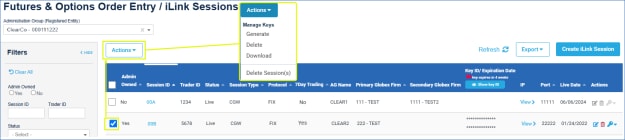
The selected session ID appears in a dialog, including existing key details.
- To continue, select Submit.
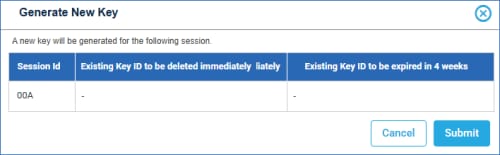
The dialog updates to include Key details.
- Select Download to proceed to a verification prompt; required before accessing private key details.
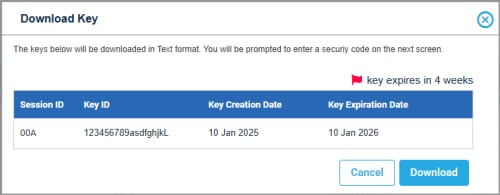
- Verify the code sent to the mobile device, then Submit.
The verification code is sent to the number associated with the CME Group Login of the user that created the Order Entry / iLink session.

The file is downloaded and an email notification is sent to the requestor and admin manager.
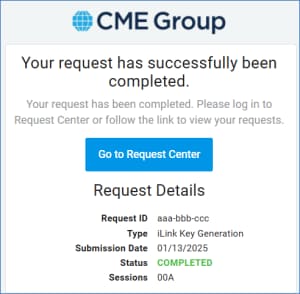
A notification appears at the top of the screen, indicating successful key generation and an email notification is sent to the registered user.
Note: Notification of pending security credential expiration will be sent by email to registered administrators.
In addition to deleting Order Entry Sessions, authorized users can delete an associated HMAC authentication key.
- To delete a HMAC security key:
- From the Futures & Options Order Entry / iLink Sessions page,select the checkbox for the session to manage, then select Actions > Delete.
The selected session ID appears in a dialog, including existing key details.
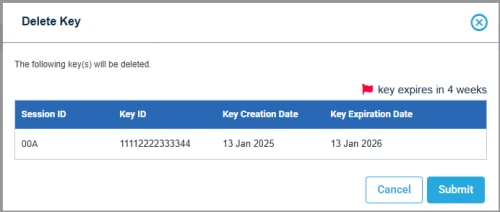
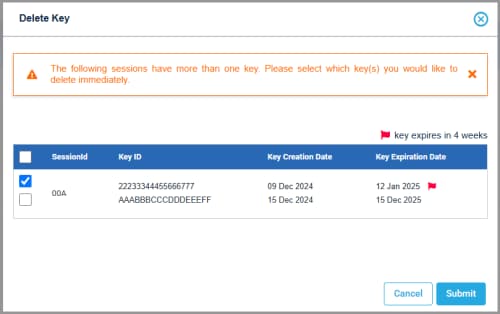
- On the Delete Key dialog, select Submit, then verify the code sent to the mobile device.
The verification code is sent to the number associated with the CME Group Login of the user that created the Order Entry / iLink session.
After verifying, the file is deleted and a notification appears at the top of the screen, indicating successful key deletion and an email notification is sent to the registered user.
- To download an existing HMAC authentication key:
Once generated, secure key information is available for download.
- From the Futures & Options Order Entry / iLink Sessions page, select the checkbox for the session to manage, then select Actions > Download.
The selected session ID and Key appears in a dialog.
- To continue, select Download.
- Verify the code sent to the mobile device, then Submit.
The verification code is sent to the number associated with the CME Group Login of the user that created the Order Entry / iLink session.
After verifying, the file is downloaded to the default browser directory.


