User Help System
Securing Drop Copy Sessions
CME Group uses a secure login process for Drop Copy and Order Entry API services.
Using self-service functions, users can generate and manage key pairs (Access Key ID + Secret Key) to secure user login and Drop Copy message activity.
- Customer identity verification: Login is signed with CME Group issued and validated security credentials.
- Message confidentiality and integrity: CME Globex uses customer submitted credentials to calculate the HMAC value to validate against a login request.
- Once created, credentials are accessible and available for multiple downloads.
- In situations when a secure key is within four weeks of expiration, a user can have two secure key pairs.
Notification of pending security credential expiration will be sent by email to registered administrators.
- If a customer generates a third secure key pair:
- The user must delete a secure key pairs immediately.
- The oldest secure key pair will expire in four weeks (at market close).
For security reasons, CME Group requires customers to change their security credentials every 12 months.
- To secure Drop Copy sessions:
Authorized users can use Drop Copy functions to generate private security keys to secure Drop Copy message activity.
Following is an overview of the secure key management process, including available functions:
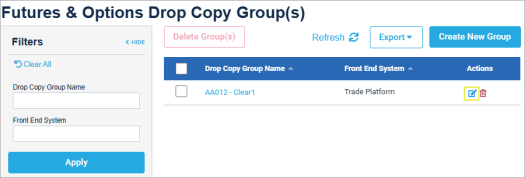
- From the Drop Copy Groups page, select Registered Entity, then select the edit (
 ) icon for the Drop Copy Group to secure.
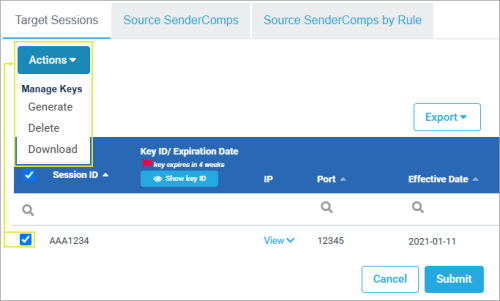
- Select the Target Session tab, then select the Session ID checkbox, then Manage Keys > Generate Keys.
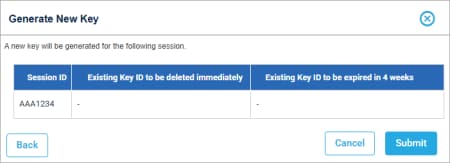
- On the dialog that appears, then Generate Key.
The dialog refreshes with the Key ID, Expiration, Download button.
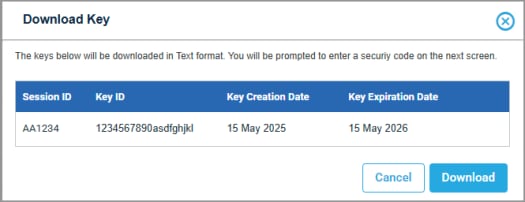
- Select Download, confirm your identity by completing multi-factor identification, then Download the key to a file directory.
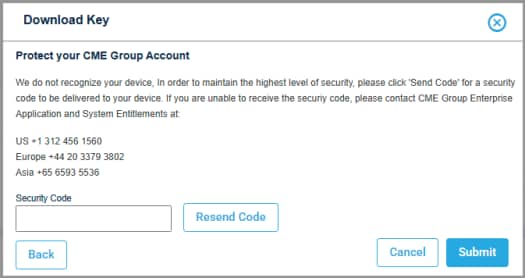
- SMS code: Sent to the default CME Group Login mobile phone.
- Contact EASE: Upon user identity verification, receive a one-time use code.
- Duo Security
- From the saved file, view the corresponding Secure Key, which is used for securing Drop Copy Sessions.
In addition, IP addresses used for connection are available from the Target Sessions tab (IP column).
Additional Options:
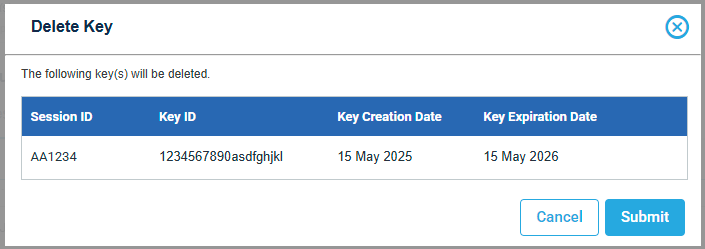
- Delete Keys: Select and confirm deletion.
- Download Keys: Download the cryptographic key as a flat text file.