User Help System
Getting Started
The AutoCert+ tool is an automated testing tool for validating application functionality. It provides a web interface for using CME Group certification scenarios.
To facilitate the process of connecting a customer application to CME Globex, CME Group provides a dedicated certification environment to allow customers to test their systems before they complete certification.
This
- Broker Firm: Enters and manages deals between a buyer and seller using the single-side model or the dual-side broker model. In a single-sided trade entry scenario, Broker Firms enter trades for Trading Firms, Single-Side Trading Firms, and Asset Management Firms. In a dual-sided trade entry scenario, Broker Firms enter trades for each Trading Firm with an account set up for broker permissions by the Account Management Service (AMS).
- Trading Firm: Enters single-sided transactions for their own accounts when they are set up as a Single-Side Trading Firm. An active trader submits trades into accounts solely owned by their Trading Firm.
- Asset Manager Firm: Enters and manages trades between a buyer and seller for different entities, funds, and/or firms. An Asset Manager Firm can enter single-sided deals in accounts assigned to them by the Account Management Service (AMS).
- ISV Firm: Develops software products that run on one or more hardware or operating system platforms on behalf of a Trading Firm, Asset Manager Firm, or Broker Firm. This software usually resides on user systems.
Connectivity and Authentication
AutoCert+ supports the following connectivity to CME ClearPort:
- HTTPS session-based connection: authenticates through Logon Request Messages.
- HTTPS sessionless connection: authenticates in the message header of every submitted request.
Before You Begin
Before accessing the AutoCert+ environments to certify your application, complete the CME ClearPort® API v.2.0 Certification Registration Form . This form also provides instructions for creating your CME login, API ID, and password.
Note: Test cases for single-sided trade requests require manual assistance from the CSET team. Before certifying your application, please contact CSET directly to schedule a session.
CSET hotline numbers and email:
- U.S.: +1 312 930 2322
- Europe: +44 20 3379 3803
- Asia: +65 6593 5593
- CSET Email: cset@cmegroup.com
Accessing and Navigating AutoCert+
- To access and navigate AutoCert+:
- Log into the automated certification tool.
- Review general AutoCert+ test suite navigation and general interview information.
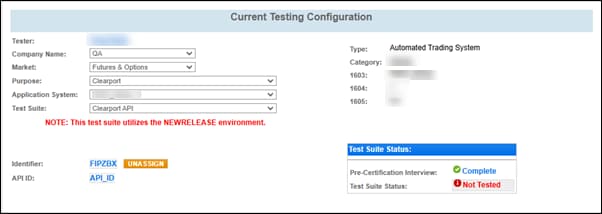
- To access the AutoCert+ CME ClearPort API test suite, select the following settings on the Current Testing Configuration screen.
- Company Name: Select a company profile.
- Market: Select "Futures & Options".
- Purpose: Select "Clearport".
- Application System: Select a test system.
- Test Suite: Select "Clearport API".
- Identifier: Select an identifier, enter your API ID, and select Assign.
- Complete the Interview for this test suite.
- Complete the applicable test cases in each test suite.
- Complete the certification process from the Post Certification tab.


