User Help System
Getting Started
The AutoCert+ tool is an automated testing tool for validating application functionality. It provides an easy-to-use web interface for using CME Group certification scenarios.
To facilitate the process of connecting a customer application to CME Globex, CME Group provides a dedicated certification environment to allow customers to test their systems before completing certification.
The following apply to each iLink test case:
- The book is clear at the beginning of each test.
- After the instrument is selected, the instrument is locked until the test is completed.
- If you submit an incorrect response to any question in a test case, you must repeat the test case from the beginning.
- For partial or complete fills, assume CME Group creates the appropriate orders in the book.
Note: If a test is not proceeding to the next step, selecting the Refresh button ( ) below the test steps may resolve the issue.
The following procedures describe and illustrate the supplemental test cases for customer firms, that previously certified for iLink 3 Order Entry for Futures & Options, to use the Cancel on Behalf (COB) Globex functionality by performing certification to support this feature.
COB is optional functionality that allows iLink 3 client system sessions for Futures and Options on Futures markets to cancel orders and mass quotes from a different iLink 3 session under the same CME Globex Firm ID (GFID). iLink 3 client system sessions will also have the ability to block future mass quote submissions from a different iLink 3 session under the same CME Globex Firm ID (GFID).
COB functionality will only support iLink 3 sessions for Futures and Options on Futures markets.
- To access and navigate AutoCert+:
- Log in to the automated certification tool in the NR / CERT environment.
- Review general AutoCert+ test suite navigation and general interview information.
- Access the Cancel on Behalf test suite.
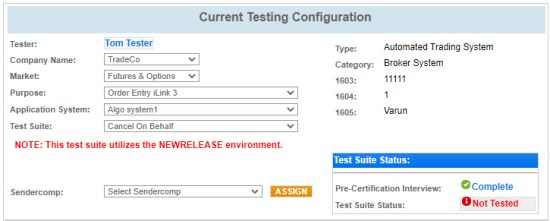
Use the AutoCert+ testing configuration menu to select the following:
- Tester: Automatically selected based on the logged in user
- Company Name
- Market: Futures & Options
- Purpose: Order Entry iLink 3
- Application System: Select the system to test. Use the refresh (
 ) button to update the list to include recently created Application Systems.
 - Test Suite: Cancel on Behalf
- Select a SenderComp, then select Assign
- Complete the Interview for this test suite.
- Complete applicable certification tests in the New Release environment.
- Complete the certification process from the Post Certification tab.


