User Help System
Audit - AMS
Use Audit - Account Management Service (AMS) function to view audit trail activity and perform searches to find related activity.

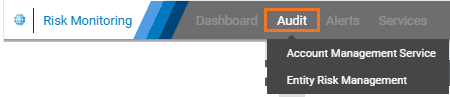
- From the Audit menu, select Account Management Service.
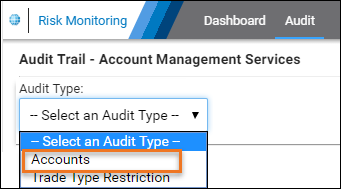
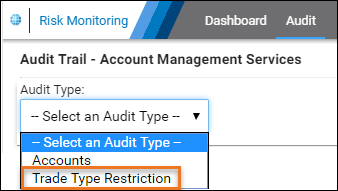
- From the Audit Type field, select either:
- Account Type: (optional) For additional search criteria, go to step 3a, 3b, 3c.
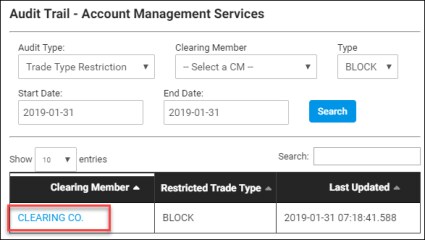
- Trade Type Restriction
- Clearing Acct

Clearing Member: Select from clearing members you're authorized to view.
Account Number
Type: Select from available account details; account, credit control, market type / product permission, firm rights, alias, threshold, limit settings, account group, trader preferences.
Date: Select the start and end date to monitor; default is today.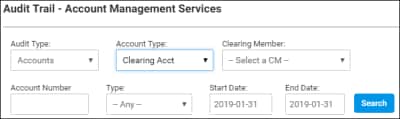
- Trading Acct
Managing Firm: Account Owner.
Account Number
Type: Select from available account setup details.
Date: Select the start and end date to monitor; default is today.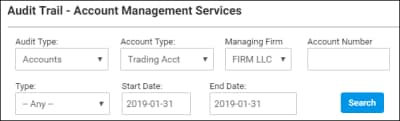
- Trade Type Restriction (TTR)
Clearing Member: Select from clearing members you're authorized to view.
Type: (default) Block trade.
Date: Select the start and end date to monitor; default is today.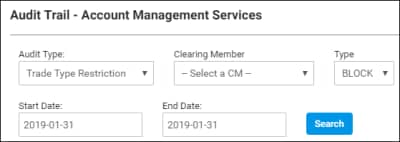
- From the search results that appear below, select the Account Number (Clearing Acct)/ Clearing Member (TTR) to view audit trail details.
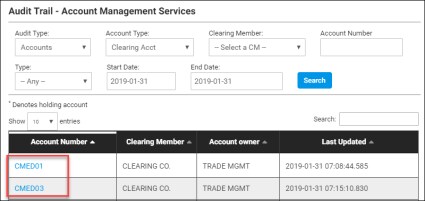
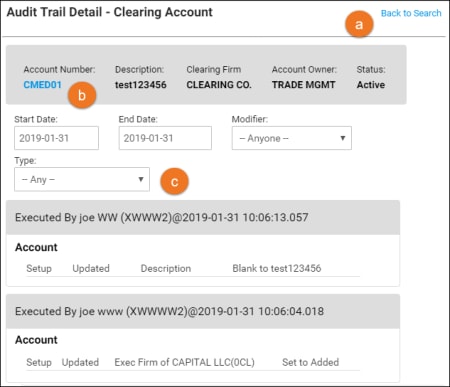
- From the audit trail detail page, the following is available:
- Back to Search: Goes back to search results.
- Select the Account Number (Clearing / Trading Acct) or Clearing Member (TTR).
- Clearing / Trading Acct: Goes to the Account Management Service - Account Details page
- TTR: Goes to the Account Management Service - Trade Type Restriction page.
- Modify Search: Using the original criteria as a basis, perform a new or more detailed search.