User Help System
CME Globex ICC Policy
Authorized clearing firm administrators can use the CME Globex ICC Policy to manage policies on an Execution Firm level, including the ability to submit orders for event swap contracts.
Authorized execution firm account administrators can view policy settings for their firm.
Available functions:
- Unregistered Accounts: Default handling of orders from unregistered accounts. Policy setting updatesare effective immediately.
- Unset Limits: Default handling of orders for products that do not have a specified limit. Policy setting updatesare effective immediately. For the specified execution firm, if limits have not been set, product limits can be set to unlimited or zero.
- Covered Strategies: Specify whether to block or ignore Covered strategies (futures) or Covereds (futures with options) strategy. Policy setting updatesare effective immediately.
- Event Swap contracts: Manage event swap contract product restrictions on the execution firm and product-code level. Event Swap Policy updates must be submitted prior to 2:00 PM CT to be effective for the subsequent trading session.
- Manage Weekend Trading permissions: To manage firm permissions for weekend trading, use the Risk Management Tools - Globex Credit Controls function.
- Globex Firm ID (GFID) Policy (Required for new GFIDs): New GFIDs do not have a default ICC Policy setting selected.
A Clearing Member/FCM admininstrative user must specify a policy setting (view instructions below).
- From the Policy & Threshold menu, select CME Globex ICC Policy.

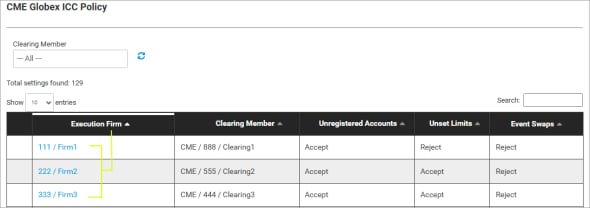
A list of all execution firms appears.
- (optional) If you have access to more than one clearing firm, clear the current selection (
 ), then select another firm.

From the list of execution firms, the following information is available:
- Execution Firm: Firm ID and Name.
- Clearing Member
Policy Settings: The current policy status appears (below).
- Unregistered Accounts
- Unset Limits
- Covered Strategies
- Event Contracts: see settings (below)

** Indicates policy settings are no longer valid due to invalid firm relationship.
* Indicates policy is not yet effective (pending).
- To manage settings, select the blue linked execution firm.
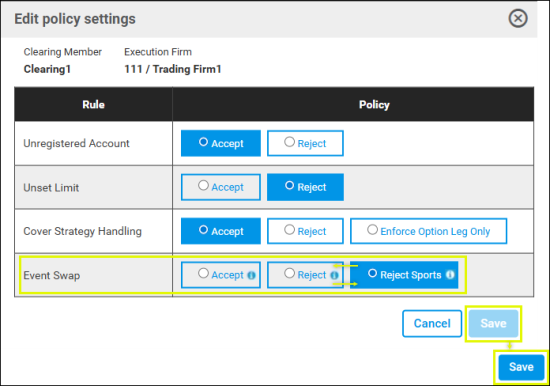
- On the Edit Policy Settings screen, select default account order handling:
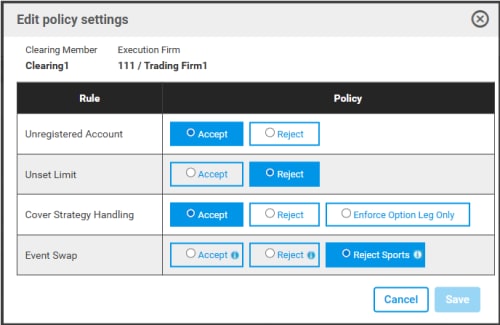
- Unregistered Account: Specify how orders from unregistered accounts are handled (Accept / Reject). Unregistered accounts are not available or active from Account Management Service.
- Unset Limits: Specify default handling of orders for products without quantity limits.
- Accept: Default setting. If limits have not been set, accounts are permitted to submit orders that are within the overall firm credit control limit.
- Reject: If ICC product limits have not been set, orders will be rejected.
- Covered Strategies: If an order is submitted for Covereds (futures with options) strategies, the enabled thresholds will be evaluated to generate threshold events which may be used to send alert emails.
- Accept: Default setting. Provide no credit controls enforcement for Covered User Defined Spreads (UDS), ICC serves as a pass through for all covered strategy orders.
- Reject: Reject all orders for covered User Defined Spreads.
- Enforce Option Leg Only: Perform position limit checks on option legs only.
- Event Swaps: By default all firms are restricted from trading event swaps and must be actively permissioned with this ICC Policy setting.
Available options:
- Reject: (Default selection) Blocks All Event Swap orders, including sports.
- Accept: Allows All Event Swap orders, including sports.
- Reject Sports: Blocks Sports Event Swaps, allows all other event swaps.
Event Swap Policy updates must be submitted prior to 2:00 PM CT to be effective for the subsequent trading session.
- To finalize, select Save.
New GFID Event Swap Policy
New GFIDs do not have a default ICC Policy setting selected.
Review the following instructions to specify a policy setting (view instructions below).
- From the Entity Risk Manager menu, select Policy & Threshold > CME Globex ICC Policy, then select a Clearing Member from the drop-down menu.
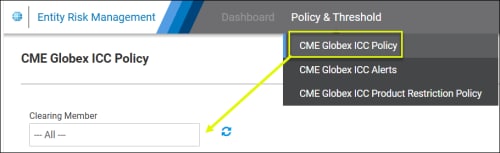
Selected automatically for users with permissions to manage only one entity.
- Select the blue (linked) Execution Firm (GFID / Firm Name) to manage.
- Select an Event Swap policy setting (for the newly created GFID) and Save.
Note: If the Save button is not enabled, momentarily select another value, then select the desired ICC Policy setting (Accept / Reject / Reject Sports) and Save.