User Help System
Searching for Transactions to Allocate
After the User selects the Allocation menu option from the navigation bar, the allocation search screen will be displayed. For additional information about search or entry fields, refer to the Allocation Field Descriptions.
To perform an allocation refer to: Entering or Importing Allocations. Two allocation modes are available:
- Single Allocation
- Manual Entry
- Import / Upload
- Mass Allocation - Import / Upload only
Allocation Search Screen
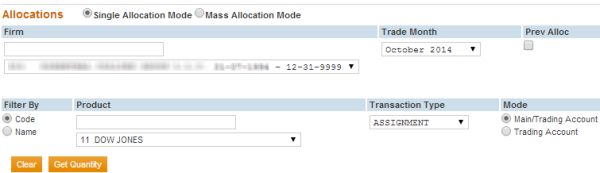
To execute a search for unallocated transactions, select the following fields:
- Firm
- Trade Month
- Product (Filter by Code or Name)
- Transaction Type
- Mode (to allocate by Main/Trading Account or Trading Account)
After completing these fields, select the Get Quantity button. The Reallocation screen will display. Depending on the Mode selected, the User will be able to select the Main Account and/or Trading Account to which transactions should be allocated.
Additional Allocation Notes
- For NYMEX/COMEX and DME Exchanges Only:
- The Show Optional Types selection allows the user to allocate the optional transaction types (those that do not have a fee impact associated with the allocation).

- For CBOT and CME Only:
- Future from Assignment or Exercise transactions will systematically be allocated to the same main and/or trading account when the corresponding Assignment or Exercise is allocated.
- A Future from Assignment or Exercise has the same product code as the option Assignment or Exercise, with the exception of Flex Options and Weekly Options. In order to allocate transactions associated with these option types, the allocation must be done using the underlying future product code.
NOTE: A translation of the Flex and Weekly option codes to the underlying futures codes is available on the EFS Home Page.
- For Soybean Crush Options the product code and quantity ratio differ between the option and the underlying futures, as shown in the table below.
NOTE: A Crush Option Exercise or Assignment can be allocated using the option product code 31. The allocation will automatically apply the correct ratio to the corresponding Futures from Exercise or Assignment.
| Commodity Code | Product |
|---|---|
|
Commodity Code S |
10 Soybean Futures |
|
Commodity Code 06 |
11 Soybean Meal Futures |
|
Commodity Code 07 |
9 Soybean Oil Futures |
For CBOT Only: The additional transaction type of Maintenance Fee is used to allocate Quarterly Maintenance Fees on ERIS Swap Futures.
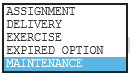
Selections include: Assignment, Delivery, Exercise, Expired Options, Maintenance