User Help System
Deal Entry & Blotter
Use the Deal Entry & Blotter component to submit proposed deals and pre-negotiated OTC deals, view status and details of submissions. Available market components, participant information, products are determined by assigned user role and account configuration; set up from the Account Management Service.
- To access the Trade Entry & Blotter component:
Select the Deal Entry ( ) function to enter details of single and dual sided deals and allege to a counterparty or Broker / Asset Manager firm.
- From the bottom-left menu select Add New (
 ).
). - From the menu that appears, select ClearPort Deal Entry & Blotter.
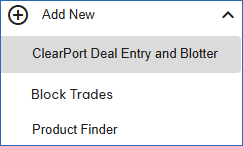
- Select a screen panel location.
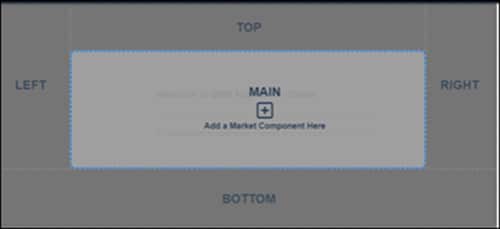
Additional methods:
a. From an open market component, select the blue + (add new) icon, then select the component and panel location. 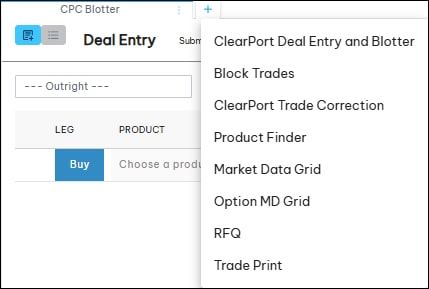
b. From the home page select the add a market component link.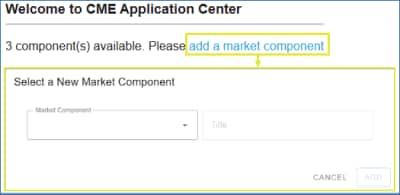
- Select Enter Trade ( - i.e. deal) .
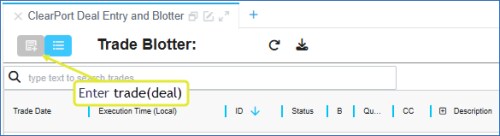
Deal Entry Interface
The Trade Entry market component consists of the following sections and functions. For additional information, see Entering a Deal.
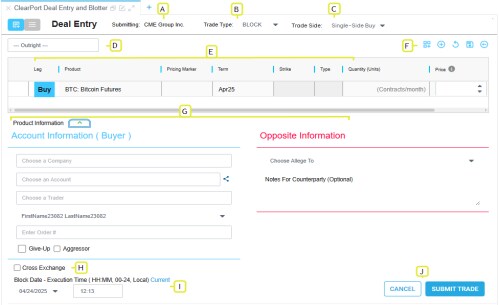
- Submitting. Indicates the user entering deal information; select if necessary.
- Trade Type: OTC transaction types available for selection - Block, EFP, EFR/EOO, OPNT, SWBLK
- Trade Side: Selection determines side and participant information required for the deal - Dual-Side, Single-Side Buy, or Single-Side Sell. Based on the selection, buyer participant information appears on the left panel.
- Strategy: Trade strategy type (default: Outright).
- Product Leg(s): Product information (price, term, quantity, settlement, etc), including buy/sell side for the leg(s).
- Product menu: Customize (
 ), add leg (
 ), clear all (
 ), save entered details as a draft (
 ), manage trade drafts (
 ).
).
- Participants: Enter account information and opposite side participant information for the proposed deal.
The buyer participant appears on the left panel.
- Cross Exchange: Marks the deal as a cross-exchange give-up; consisting of a CME group exchange product and non-CME Group exchange product.
- Date / Time: The date and time the trade occurred (24 hour format).
- Submit / Cancel: Submits a deal for review and clearing.


