User Help System
Creating a Globex Firm ID
The following instructions illustrate the process for authorized users to create a Globex futures and options GFID trading entity identifier and associate with a clearing firm at an exchange.
Submitted requests are reviewed by the firm's clearing exchange administrator.
See also: Accessing Futures & Options Globex Firm IDs.
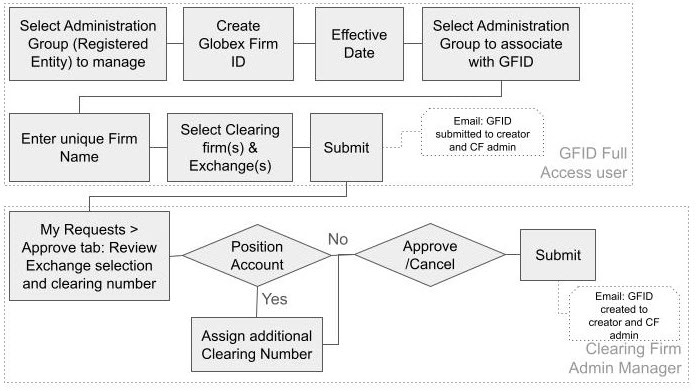
- To create a Globex Firm ID:
- From the Futures & Options Requests - Globex Firm ID page, select Create Globex Firm ID.
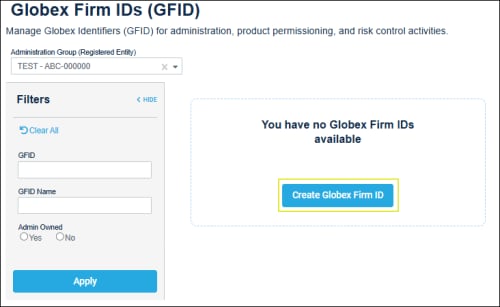
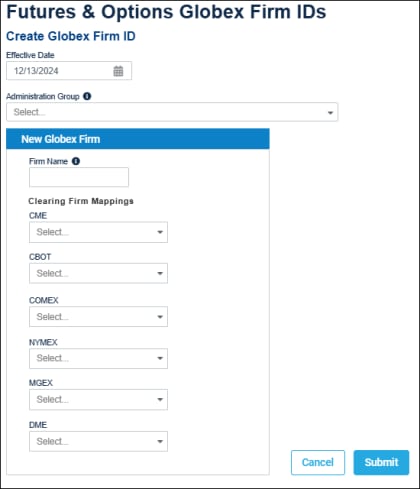
Note: Required fields are indicated by an asterisk (*).
- Effective Date (default: today's date): Upon admin approval, GFIDs are available on the specified date.
- Administration Group (Registered Entity): The new GFID will be associated with the selected entity.
- Firm Name: Enter a unique (at the Registered Entity level) executing/trading firm name.
- Clearing Firm Mapping: For the designated Clearing Exchanges, select at least one Clearing Member to associate with the executing/trading firm.
Clearing Firm Mapping - Updates: If a clearing firm mapping update is required, CME Group advises:
- At least one week prior to the effective date, notify the current clearing firm of the intention to change mapping.
- Coordinate updates to become effective at the close of the business Friday.
- If a mid-week update is required, contact Global Account Management.
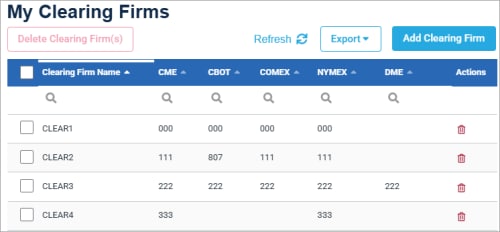
Note: To update / add available clearing firm selections, select Request Center (ESS) > Preferences > ClearingFirms
 >
> 
- To complete the request, select Submit.
A notification banner appears and email notification is sent to the requestor and clearing firm admin manager.

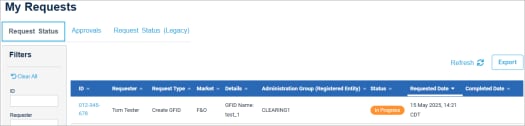
The request is accessible from My Requests (ESS) - Request Status tab to view status, or clearing firm admin manager decision (via Approvals tab).