User Help System
SPAN® and SPAN 2® Framework
These instructions cover how to margin if you have already built a portfolio or uploaded a portfolio.
- To margin with SPAN or SPAN 2 framework:
- Check the box in the first column for the portfolio that you wish to margin (only F&O portfolios can use the Margin drop-down menu option).
- Select the drop-menu for Margin.
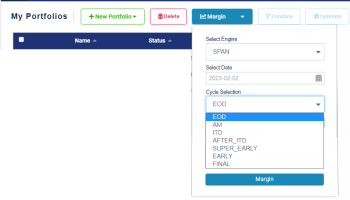
- Select Engine (SPAN or SPAN 2 framework).
- Select the Date (defaults to prior day; can be up to 18 months prior).
- Select the Cycle Selection (defaults to EOD).
Cycle Name within CME Core SPAN File Cycle Code Approximate Timestamp of Risk Data AM “.a” ~10:00 AM CT ITD “.i” ~11:00 AM CT AFTER_ITD “.ai” ~1:00 PM CT SUPER_EARLY “.be” ~2:00 PM CT EARLY “.e” ~3:00 PM CT FINAL “.s” ~4:30 PM CT EOD “.c” ~5:45 PM CT - Select Margin.
Note: Message "Margining in progress..." appears momentarily. If you do not use the Margin drop-down (simply selecting Margin from the My Portfolio menu) the default will be for SPAN framework, day prior and EOD settings.
Note: If you enter a date in the past (e.g., a year prior) and your trades include products that did not exist at that time, the system will display validation errors. Therefore, be sure to enter valid trades for products that existed at the point in time for which you want margin calculated. This is best accomplished by uploading trades from a .CSV file. The build wizard's 2. Add Trades is only applicable to products that exist today.
Note: Margin results returned using SPAN2 includes requirements for SPAN2 products; whereas margin results returned using Margin will not include requirements for SPAN 2 products.
- To view Risk Report with SPAN 2:
- Check the box(es) in the first column to select the portfolio(s) (with SPAN 2 products) for which you want to generate a risk report.
- Select Risk Reporter. The system displays the results at the bottom part of the screen; scroll to the right to see additional columns and information.
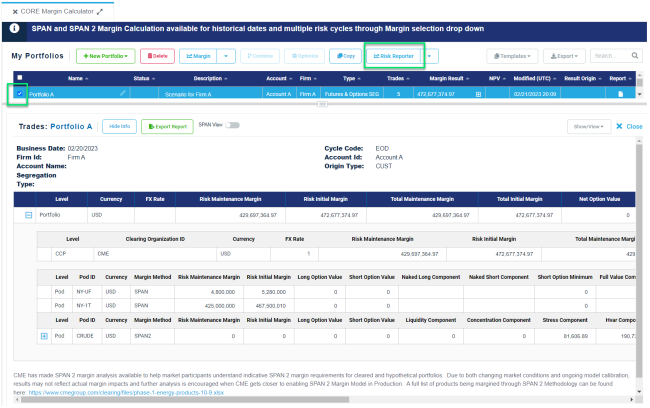
- Risk Reporter shows the risks at three levels:
- Portfolio: aggregate sum of all requirements.
- Pod: the combined commodity level aggregate requirement.
- Product Group: lowest level of detail provided in the SPAN2 framework.
- Export Report downloads the report in a .CSV file.
- Select X Close to close the report.
Note: All portfolios with in-scope SPAN 2 products will return margins in the SPAN 2 framework when selecting Margin.


