User Help System
CME Benchmark Administration Premium Incremental Message for CVOL
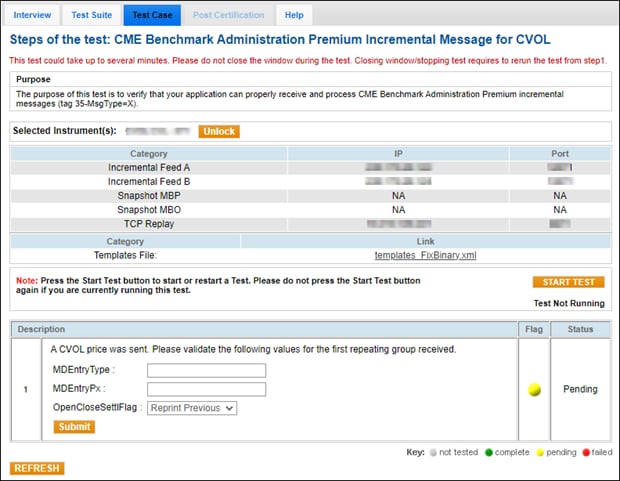
The purpose of this test is to verify that your application can properly receive and process CME Benchmark Administration Premium incremental messages (tag 35-MsgType=X) for CME Group Volatility Index (CVOL™).
Note: See also:
- CME Group Benchmark Administration
- CME Benchmark Administration Premium Message Specification
Prior to beginning the test, select:
- From the Testing Configuration screen, select an Identifier, then select Assign.
- On the selected Test Case screen, select an Instrument, then select START TEST.
- To run a CME Benchmark Administration Premium Incremental Message (for CVOL) test:
AutoCert+ sends a CVOL price. Validate the following values for the first repeating group received.
- tag 269-MDEntryType
- tag 270-MDEntryPx
- Select an applicable tag 286-OpenCloseSettlFlag:
- 107=Real Time
- 108=Final Daily
- 109=Preliminary Daily
- 110=Reprint Previous