User Help System
Profiles
Profiles consist of pre-defined search queries called global templates and user-customized search profiles, which users create, save and manage.
Global Templates
Global templates--e.g., EBS (Foreign Exchange)--are accessible to users to quickly populate predetermined fields geared for a particular market. These templates have fields selected that are relevant to each asset class and include appropriate columns.
Note: CME Group may create additional Global Templates as needed.
- To search with a Global Template
- Select the Global Template from the Profile menu.
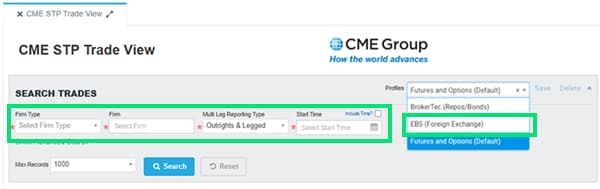
- Populate the required fields
- Firm Type
- Firm
- Multi Leg Reporting Type
- Start Time
- Select Search.
User-Customized Profile
- To save a user-defined search query as a profile
- Use the Search Trades feature to identify your search criteria including the selection of specific columns and sort order.
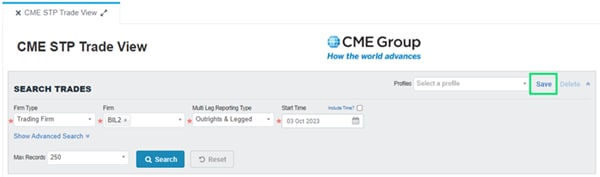
- Select Save in the My Profiles section.
- Provide a descriptive name and select Save. Optional: Check the box Make This My Default Profile.
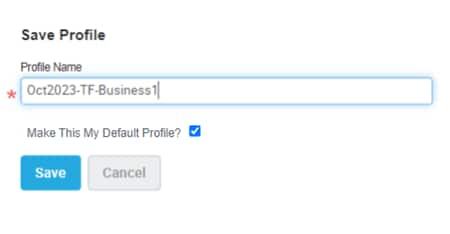
Note: Upon login, your default profile runs its search query for the current date (using the current date in all date fields).
- To use a saved profile
- Use the drop-down menu for Profiles and select from the list of previously saved profiles. Result: The Search fields populate with options from the saved profile.
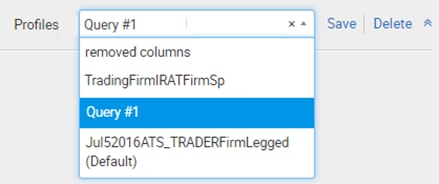
- Select Search to display the search result. You may then select Reset or the X in the Profiles name to clear the search fields.
- To delete a search profile
- Use the drop-down menu for Profiles and select from the list of previously saved profiles. Result: The Search fields populate with options from the saved profile.
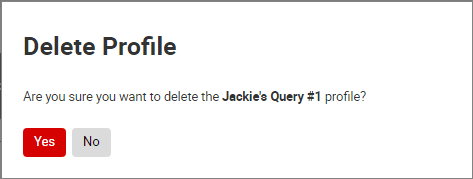
- Select Delete.
- Select Yes at the prompt:
- To edit profile
- Use the drop-down menu for Profiles and select from the list of previously saved profiles. Result: The Search fields populate with options from the saved profile.
- Modify content of Search fields as necessary.
- Select Save.
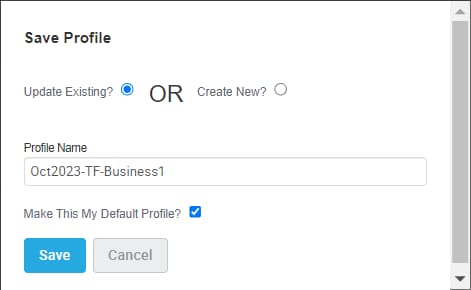
- Select either to Update Existing or Create New and enter a new Profile Name.
- Select Save.


