User Help System
Assigning Mass Quote Protections
The following instructions describe the process to assign product line / group mass quote protections for a market participant.
- To assign MQP and configure thresholds:
- From the Mass Quote Protection page, enter market participant and / or product search criteria, then click Search.
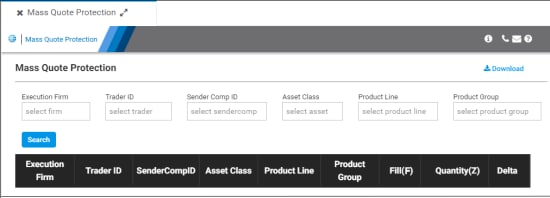
- Market Participant fields: Execution Firm, Trader ID, Sender Comp ID.
- Product fields: Asset Class, Product Line, Product Group.
Note: Clicking Search without entered criteria searches all entitled mass quote details.
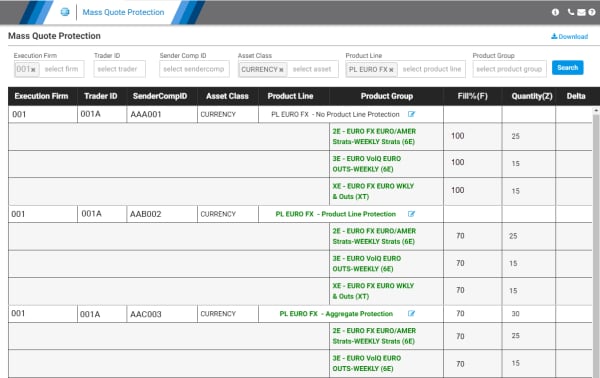
- From the search results, select Edit Product Line Configuration (
 ).
).
User selected mass quote protections require at least one MQP Type in positive whole integers between 1 through 9999.
Configuration Options:
- Product Line Protection options
- Product Line enabled with no Product Line MQP values - If a Group Code is part of the Product Line and the Group Code’s MQP tally triggers the customer’s threshold value, then the customer’s resting quotes for the Product Line are automatically canceled.
- Product Line enabled with Product Line MQP values - A tally to the more restrictive MQP threshold value, in excess of the Group Code and/or Product Line threshold, will trigger MQP functionality. The customer’s resting quotes for the Product Line are automatically canceled by CME Globex if either of the following occurs:
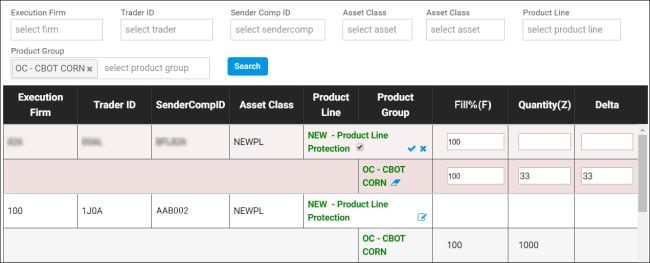
- Aggregate Protection
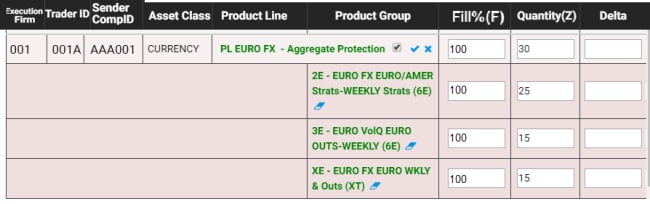
- Product Group Protection

- Fill % (F): During a given MQP exchange set evaluation period (one-second), the cumulative sum of the execution quantity of a quote, relative to its original quote quantity (traded quantity of the original total quantity).
Tallies each time a quote's bid or ask trades.
The Original Booked Quantity of the quote is retained for calculating the fill percentage for all partial trades during the MQP duration.
The following is treated as a new quote for calculations: (i) Modifications to quote quantity, (ii) percentage of trades as percentage the original quote are retained, (iii) modified quote.
Note: Percentage protection must be greater than or equal to 70 percent - Percentage = ∑( Traded Quantity in this Match Event / Original Booked Quantity of the quote )
- Traded Quantity (Z): Traded quantity-based MQP. Tallies the number of lots traded.
- Delta (D): Traded delta-based MQP set by customers in absolute terms.
- Tallies the net delta (equivalent futures) from each trade within the exchange set evaluation time (one-second). The value is entered as a positive integer but is evaluated at the positive (Long Call, Short Put) and negative (Short Call, Long Put) integer equivalents (e.g. a delta threshold value set at '5' equates to +5 or -5). Positive deltas increment the counter and Negative Deltas decrement the counter.
- Deltas are calculated every 15 seconds throughout the trading session.
- Deltas are netted for option spread trades (e.g. an option spread trade with leg deltas of +0.30 and -0.40 nets to -0.10).
- The D tally can exceed the threshold value by a resting quote's total delta minus (or plus) 1 delta.
Configuration options
- Enable / Disable Product Line Protection: Select to enable MQP for the Product Line and its Product Groups.
- Delete all Product Group Protections(
 ): For a given product group, delete all entered values.
 - Entities with Product Line Protection must have values entered for at least one Product Group.
- Cancel Editing(
 ): Revert updates and cancel editing.
- To submit entered values, select Submit Changes (
 ), then OK on the confirmation dialog.
MQP protections are effective immediately for the next customer submitted mass quote.
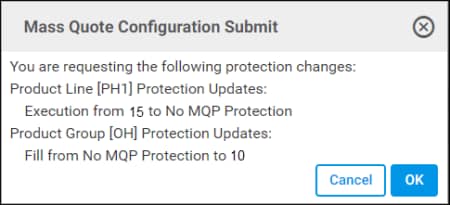
Depending on the Type and Level assigned, MQP threshold values are established at the Aggregate / Product Line / individual Group(s) levels.
For additional, see MQP Types (above), Product Line checkbox, Product Line, Values (below).
Enforcement
Using specified values, enforcement is available at the Product Group, Line and / or Aggregate levels; for each type and reference value.
Quotes that exceed the value of the respective MQP reference value (limit), within the exchange set time interval will be rejected; causing cancellation of resting and rejection of new mass quotes.
Available Product Line, Group Code or Aggregate protection are activated by the following configuration:
Product Group - (No Product Line Protection)
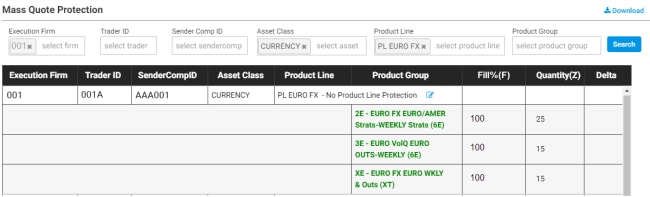
- Product Line checkbox: Not selected.
- Product Line: Not entered.
- Values: Entered at Product Group level
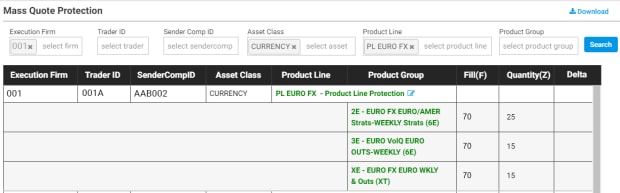
- Product Line checkbox: Selected.
- Product Line: Not entered.
- Product Group: Value entered
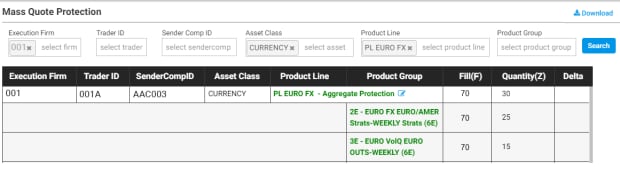
- Product Line checkbox: Selected.
- Product Line: Value entered.
- Product Group: Value entered.
Additional details
For additional details refer to the Client Systems Wiki - Mass Quote Protections:
- Mass Quote Overview Video
- Time interval: Exchange-defined time interval during which MQPs are counted and enforced.
- MQP Types: Reference values with examples.
- Enforcement Levels: Protection types with examples.
- Trigger: Scenarios and examples that trigger MQP.
- Message Reset: Describes manual reset of MQP tally(s) to zero and subsequent Mass Quote message processing.
- Product lines: Product lines currently available for MQP.


