User Help System
Cash Adjustment – Carrying Perspective
After performing a search, carrying firms can perform the following tasks:

View Messages
Carrying firms can view messages to see why cash adjustments were rejected.
- To view messages:
- Search for cash adjustments.
- Select the check box for the rejected cash adjustment.
- Select View Messages.
Note: You may only view one message at a time.

- To view the user information (Rejected By), select View User Info.

- To return the search screen, select New Search.
Reject Cash Adjustments
Carrying firms can reject cash adjustments.
- To reject a cash adjustment:
- Search for cash adjustments.
- Select the check box for the cash adjustment(s).
Note: If Check All is selected, only the rows that are currently being displayed are selected.

- Select Rejected.
- Select or enter a message.

- Select Submit.
A confirmation message displays, indicating that the cash adjustments were rejected.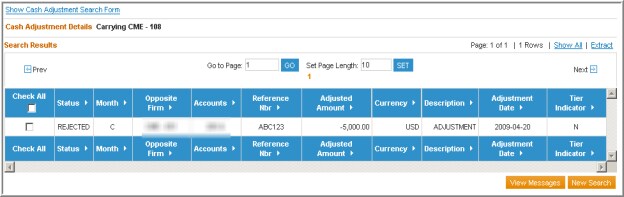
Accept Cash Adjustments
Carrying firms can accept cash adjustments.
- To accept a cash adjustment:
- Search for cash adjustments.
- Select the check box of a cash adjustment(s) with Rejected status.
Note: If Check All is selected, only the rows currently displayed on the page are selected.

- Select Accepted
- Select Submit.
A confirmation message displays, indicating that the cash adjustments were accepted. The Status is now blank, which indicates an implied acceptance.


