User Help System
Rate Sets
A rate set must be established for each agreement. You may perform the following tasks for rate sets (executing perspective only):
- Create Rate Sets (Executing Perspective Only)
- Copy Rate Sets (Executing Perspective Only)
- Delete Rate Sets (Executing Perspective Only)
- Edit Rate Sets (Executing Perspective Only)
Create Rate Sets (Executing Perspective Only)
You may create a new rate set, which includes adding the rate details, effective date, and the expiration date.
- To create rate sets:
- Select Create.

- Add a "pass thru" to indicate that rates should not be applied to this agreement.
- Select Create Pass Thru.

For tiered agreements, the Rate Maintenance screen displays.
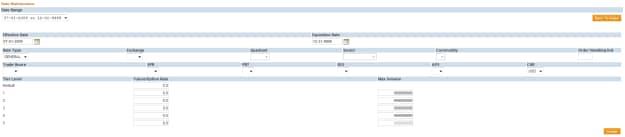
The Default rate will apply to product / groups not specified by the tiered agreement. Tiered rates apply to futures and options equally; you cannot specify different rates for futures versus options.
Copy Rate Sets (Executing Perspective Only)
You may add a rate set that mirrors a rate set of another existing agreement.
- To copy rate sets:
- Select Copy
- Choose the agreement with the rates that you would like to copy.
- Enter the Effective Date of the new rate set.
- Select Submit.
The rate list is immediately updated.
Delete Rate Sets (Executing Perspective Only)
Unlike agreements and accounts, rates can be deleted if trades are associated with them.
Note: None of the fees for the attached give-up trades will be calculated once the rate set has been deleted.
- To delete rate sets:
- Select Delete.
An alert message displays, asking, “Are you sure you want to delete the current rate set?”
- Select OK.
Edit Rate Sets (Executing Perspective Only)
The Edit option on the Rate Maintenance screen allows the end-user to modify the start and / or end date of the rate set.
- To edit rate sets:
- Select Edit.
- Select the Date Range.
- Select Apply Changes.
- A confirmation message displays indicating that the rate set has been updated.
All trades associated with the agreement with the updated rate set will be flagged to recalculated.



