User Help System
Add Trade Rules
You can set rules to associate an executing firm with a carrying firm on the Trade Rules page.
- To add trade rules:
- Select Transaction Viewer.
- Select Trade Rules.
- Make a selection in the Executing Firm drop-down.
- Make a selection in the Carrying Firm drop-down.
- Select Add.
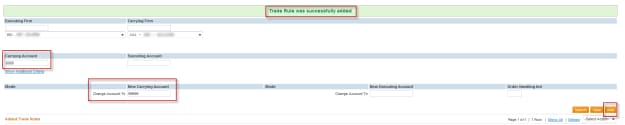
In this screen, the Executing Firm and Carrying Firm selections appear.
- Enter an account number in the New Carrying Account field.
- Enter an account number in the New Executing Account field.
- Select Add.
The following screen appears.

- To display the trade rule, Select Search.
The Trade Rule details appears.

- To specify additional criteria,
- Select Edit Rule in the drop down.
- Select Show Additional Criteria.

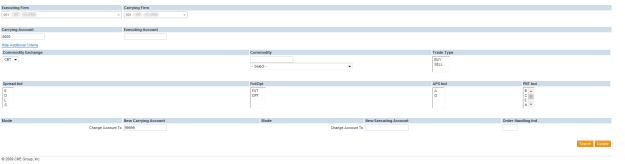
Additional trade rule fields include:
- Commodity Exchange: Select an exchange to which the trade rule will apply.
- Commodity: Select a commodity to which the trade rule will apply.
- Trade Type: Select whether the trade rule will apply to buy trades or sell trades.
- Spread Indicator: Select a spread type:
- S or 6 = Spread
- D= Differential Spreads
- L= Legged Spreads.
- F/O: Select whether the trade rule will apply to a futures or options trade.
- APS Indicator: Select one of the following
- A = Average Price Trade
- G = Give-up Trade
- PNT Indicator: Select B=Block Trade, O=OPNT, E=EFP Trade, N= EFR Trade, C=RFCor T=EFS Trade


