User Help System
Account List (Executing and Carrying Perspective)
- All added accounts appear in the Account List section.
- In this section, Executing Firms can edit, delete, or transfer an account to another agreement, or view messages on rejections.
- Carrying Firms can either reject or re-accept an account(s) within the account list.
- The Account Status field displays an “R” if the account has been rejected. All rejections in GPS contain a message.
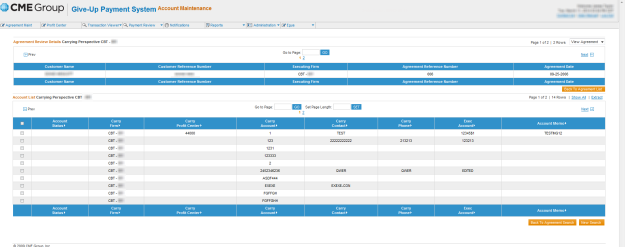
Account List Column Descriptions
| Column | Description |
|---|---|
|
Account Status |
Displays whether the account has been accepted (if left blank, implies acceptance) or rejected (“R”) by the carrying firm. |
|
Carry Firm |
Displays the 3-digit firm id and its associated exchange. |
|
Profit Center |
Displays the profit center to which this agreement is posted. If the account level profit center is populated, this will override the profit center entered at the agreement level. Note: The executing firm can add, but cannot delete or update a Profit Center at the account level if the system is in the lock period. (Optional) Note 2: The Carry firm now has the ability to add its own Profit Center visible only to the carry firm. The Carry Side Profit Center can be used to designate another bank account from where money can be debited. |
|
Carry Account |
Displays the carrying firm account number that will be used for calculation purposes. |
|
Carry Contact |
Displays the carrying firm contact person's name for this account. |
|
Carry Phone |
Displays the carrying firm contact person's phone number for this account. |
|
Exec Account |
Displays the executing firm account for which trades were executed. If populated, will be used in conjunction with the carrying account for calculation purposes. |
|
Account Memo |
Displays an editable informational field at the user's discretion. |


