User Help System
Instruction History
The RMI Instruction History function allows the Risk Management Interface (RMI) Risk Administrator to view, filter, and export the last 10 days of blocked, unblocked and cancel activity within RMI.
- To view Instruction History:
- From the RMI tab, select Instruction History.
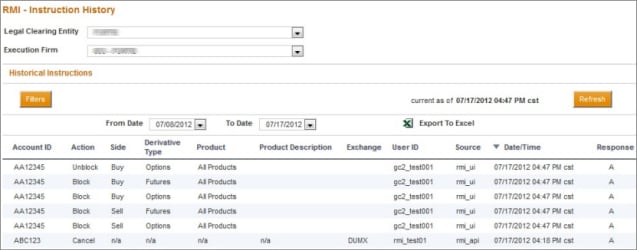
Note: When the number of results exceeds 5000 rows, select Next or Previous to navigate the result pages.
Perform any of the following actions to filter or sort the activity information:
- To narrow an account search, select Filters, select search criteria, then select Apply:

- Select the From Date and To Date drop-down boxes to filter activity by specific dates within the last 10 days. After setting the date range, select Reload to update the search results.
- Select any column heading to sort the results.
- Select Refresh at any time to clear all sort/filter criteria and view most recent activity.
- To export the activity information to Excel:
- Select the Export to Excel icon. The File Download window appears, prompting to Open or Save the file.
- Save the file in a desired location or Open the file to view the output:



