User Help System
View Session Stats in FADB
The Session Stats functionality displays and provides users with the ability to view volume figures applicable to iLink Session ID Policy administration.
- To view iLink session ID statistics:
- Select the Session Stats tab. This automatically displays the Globex Firm ID’s Average Daily Volume (ADV) for the last 2 quarters, corresponding MSGW iLink Session Allowance and MSGW iLink Session ID Excess Capacity (ECC) Allowance. Please note that as documented in the iLink Session ID Policy and Operational Guidelines documentation, starting September 11, all Globex Firm IDs will default in the FADB to display only 2 MSGW sessions as that is the maximum allocation customers deploying a front end system which has certified to MSGW functionality may request.
Effective Thursday, October 1, the Phase 1 launch period of the iLink Session Policy is scheduled to begin and expected to last through February 2016 (subject to change). During Phase 1, a 30% MSGW iLink session ID allocation limitation will be in effect.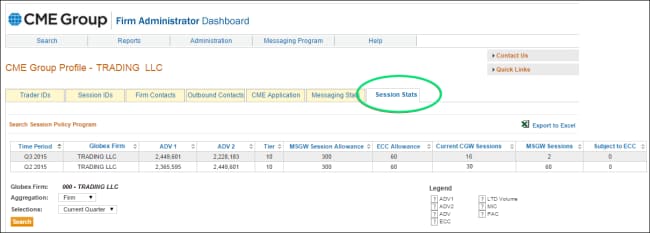
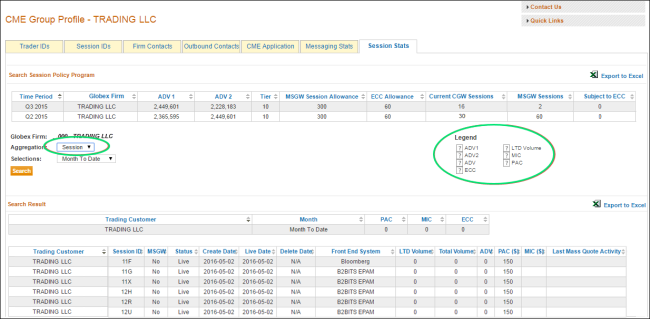
Note: Moving the mouse pointer over the  symbol, on the Session Stats Legend, displays descriptions of iLink session IDs as tooltips.
- Selecting the Session and Month to Date criteria displays a breakdown of historical monthly activity and iLink Session ID Policy charges for the last 12 months by individual iLink session ID.
- Selecting the Firm and <quarter> criteria displays a breakdown of tier allocation per quarter:
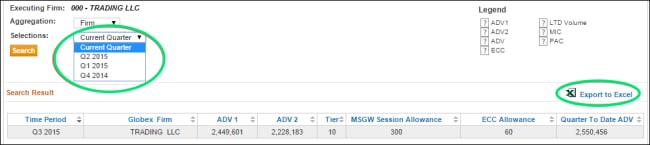
Note: To export the results to Excel, select Export to Excel.


