User Help System
Product Complex Restrictions
To support firm risk management, Entity Risk Management includes functions to set and manage Product Complex Restrictions at the execution firm level by grouping products (e.g. Sports Index Futures / Event Contract Swaps) then managing group-level policy settings. This allows users to restrict / (un)restrict products via a single selection. This streamlined risk management function, reduces the need to specify individual product-level settings.
To support seamless order validation, policy updates should be submitted prior to the start of the relevant trading session.
In addition, a filter and bulk upload function is available to manage product-level configuration.
- To manage product complex group restrictions:
- Select the Policy & Threshold menu, then select CME Globex ICC Policy.

- Select the Clearing Member (selected automatically) firm and Execution firm to manage (if applicable).

(optional) If you have access to more than one clearing member firm, clear the current selection ( ), then select another firm.
- On the Edit Policy Settings screen - Product Complex Restrictions panel.
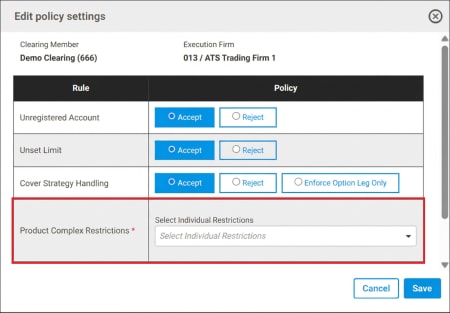
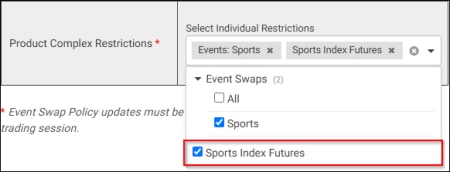
- Select the Product Group and desired restriction, then select Save.
- Restrict - check: For the given Clearing Member firm and Execution firm, the entire product group (including all individual products) will not be tradeable.
- Unrestrict - uncheck: For the given Clearing Member firm and Execution firm, the selected product group will be tradeable. Also requires firm / account permissions and credit risk settings.
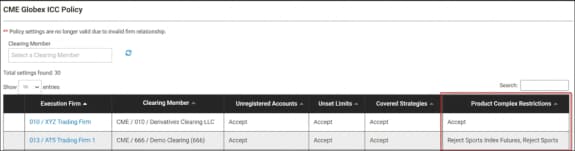
Updated restriction settings are available on the main CME Globex Policy page (Product Complex Restrictions column).