User Help System
CM Settings
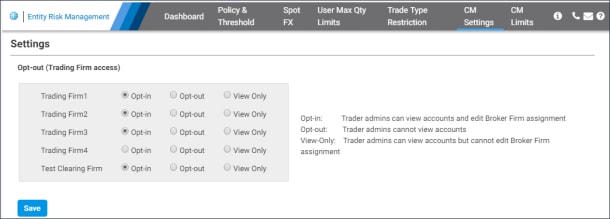
Use the CM Settings to manage trading firm entitlements to view account credentials.
- To manage CM Settings:
- Select the CM Settings menu.
On this page, view a list of Clearing member firms for which you are entitled, for CME ClearPort / CME Globex clearing firm admins.
- Select a clearing firm to manage trading firm access:
- Opt-in: Default, Trader admin can view account and manage broker firm assignment.
- Opt-out: Trader admin cannot view account or manage broker firm assignment.
- View-only: Trader admin can view accounts, but cannot manage broker or firm assignment
- To finalize, select Save.


