User Help System
View Existing Main Account
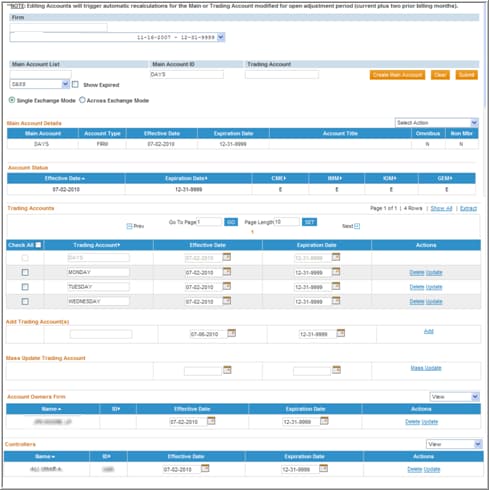
Within the Account Maintenance – View screen, the User can view an existing registered Main Account by performing the following steps:
- Select Firm
- If the firm number is known, type it in the Firm box.
- If the firm number is not known, click the arrow for the Firm drop-down, scroll through the list and click to highlight the appropriate firm.
- Select the Main Account
- Click the arrow for the Main Account List drop-down. The User will then be able to scroll through the list of main account numbers for that firm until the desired account is located or;
- The User may utilize the Autocomplete feature that suggests possible main account matches as text is entered within the textbox. If the AutoComplete feature suggests more than one Main Account, click to highlight the appropriate account.
- Select the Trading Account (Optional)
- The User may enter a Trading Account Number to search for a specific trading account registered under the Main Account previously selected. The account number entered must be an exact match or no results will be returned.
- The user may also choose to search using only this field if the Main Account is not known.
- Select Submit
- The associated account details will display after selecting the Submit button.
NOTE: To view expired Main Accounts in the Main Account List drop-down, and to display expired account information in the corresponding results, check the box labeled “Show Expired”.
Account Maintenance – Results after Search Performed