User Help System
Expiring Main Account
This feature allows the Main account and all of its associations (trading accounts and owners/controllers) to be expired. Note: The User may use the Across Exchange Mode to expire the Main Account at multiple Exchanges simultaneously, as long as that account exists at each selected Exchange.
- From the drop-down, select Expire Main Account.
- The Expire Main Account section will display.
- Enter the Expiration Date (MM-DD-YYYY) manually or use the calendar icon to select the expiration date.
- Select the Submit button.
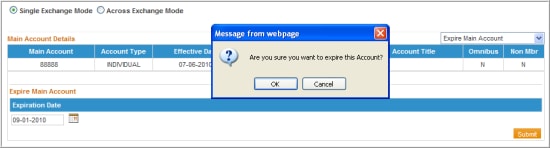
- A Message Box will display asking the User to confirm the expiration of this account. Select OK to continue the expiration, or select Cancel.
Editing Main Account: Expire Account Screen
- If OK was selected, then a confirmation message will display above the Account Details section stating that the account has been expired.

NOTE: Once the main account has been expired, the only way to view this account and all its associated trading accounts is to click the “SHOW EXPIRED” box when submitting a search.


