User Help System
Edit Main Account
This feature allows the User to edit the Main account details. Note: The User may use the Across Exchange Mode to edit the Main Account at multiple Exchanges simultaneously, as long as that account exists at each selected Exchange.
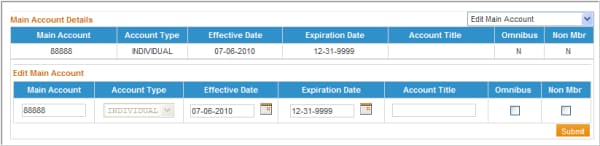
- From the drop-down, select Edit Main Account.
- The User can edit the following:
- Main Account Number
- Effective or Expiration Date
- Account Title
- Omnibus Indicator
- Non-Member Indicator
NOTE: The Account Type field cannot be modified; the user must instead expire the Main Account and create a new Main Account record using the Copy Main/Training Account(s) function noted above.
- After the appropriate fields have been updated, click Submit. A confirmation message will display above the Account Details stating that the account has been updated.


