User Help System
Copying Main / Trading Account(s)
This feature is available in Single Exchange Mode only. The most common use of the Copy Main/Trading Account(s) feature is when the Account Type is changing for an existing Main Account, for example, from or to the Individual to Firm. The User can expire the existing Main Account and then use the Copy feature to recreate the same Main/Trading account grouping with a modified account type.
The Main/Trading Account ‘to be copied’ must be expired prior to executing the Copy Main/Trading Account(s) functionality; two active instances of the same Main/Trading Account(s) cannot exist.
- Once the Main Account the User is copying from has been expired, perform a search for that Main Account by selecting the Show Expired box.
- Select Copy Main/Trading Account(s).
- The Copy Main/Trade Account section will display.
- The User can edit the following:
- Account Type
- Effective or Expiration Date
Note: The effective date must be greater than or equal to the next calendar date after the expired date, so there is no overlap.
- Account Title
- Omnibus Indicator
- Non-Member Indicator
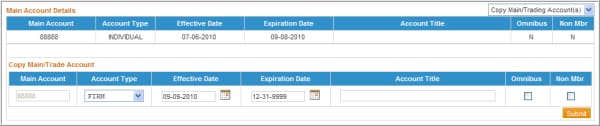
- After the appropriate fields have been updated, click Submit.
A confirmation message will display above the account details stating that the account has been copied.

NOTE: The copy feature will NOT copy over the Owners and Controllers since the account type has likely changed. The User is required to add the Owners and Controllers as needed.


