User Help System
Adding Trading Accounts
Trading Accounts that have the same owner(s) and controller(s) can be grouped together under a single Main Account. If no grouping is done, then each Trading Account must be registered separately and will reflect the Trading Account number as the associated Main Account record. The Main Account record is utilized for applying the associated Exchange fees, so it is important that the Trading Account relationships are registered correctly.
NOTE: The Trading Account may only exist under one main account / clearing firm for a specific date range. Also, the Main Account entered will automatically become a Trading Account; therefore, this does not need to be re-entered.
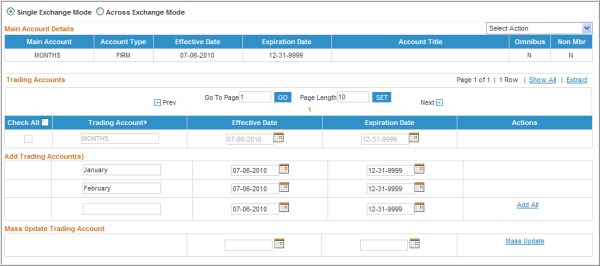
The following is displayed for the Trading Accounts section:
- To add a new Trading Account:
- Enter the account number (up to 20 characters) into the textbox in the first row under Add Trading Account(s).
- Enter the associated Effective and Expiration dates (should be equal to or between the Main Account’s effective and expiration dates).
- To add multiple Trading Accounts where the effective and expiration dates are the same, use the ENTER key on the keyboard. After selecting ‘ENTER’, a new row will automatically be displayed to input the next Trading Account and the dates will already be populated.
- To add multiple Trading Accounts where the effective and/or expiration dates differ, use the TAB key on the keyboard. The TAB key will bring the User to the next field and will create a new row once the Trading Account, Effective Date and Expiration Date have been entered in the current row.
- After entering all of the Trading Accounts, click the Add (when a single Trading Account has been added) or Add All (when more than one Trading Account has been added) link under the Actions column.
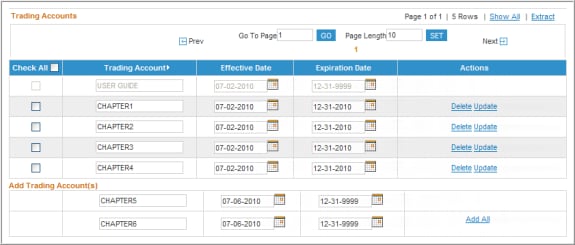
- A confirmation message will appear above the Account Details stating that the new Trading Account(s) have been successfully added.

NOTE: If the number of Trading Accounts registered exceeds 10, the system will automatically paginate the list at this time. To display all Trading Accounts, select the Show All hyperlink to remove the pagination.


