User Help System
Alerts and Rejects Dashboard
The Alerts Dashboard provides a view of alerts generated for Grantee Groups.
A Warning % can be set on each Grantee Group’s Gross and Net limits. If those warning thresholds are hit or exceeded during the course of the trading day, or if a reject is generated then alerts will appear on the dashboard.
During a single trading session, users may receive up to one Warning % level breach and one reject per credit type for each Grantee Group unless the daily limit is adjusted during the trading day; Warning % alerts and rejects will then be based off of the new limits.
- The Threshold Warning displays the details of the Warning% breached for each credit type.
- A Critical Alert will indicate when limit usage has hit or exceeded 90%.
- The Reject alert will provide additional details of the reject itself including the firm entering the order, side, instrument and the reason for rejection.
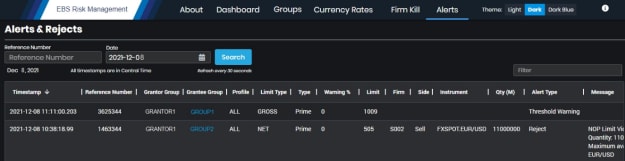
- Reference Number: A reference number is included on all email alerts and may be used to search for details of the email alert.
- Date: The current date will be defaulted and all alerts generated on the current date will be displayed on the Alert Dashboard. This date may be modified to search for alerts on a specific date.
- Filter: A search for any text on the Alert Dashboard.
Note: All timestamps are in US Central Time (CST).


