User Help System
Orders
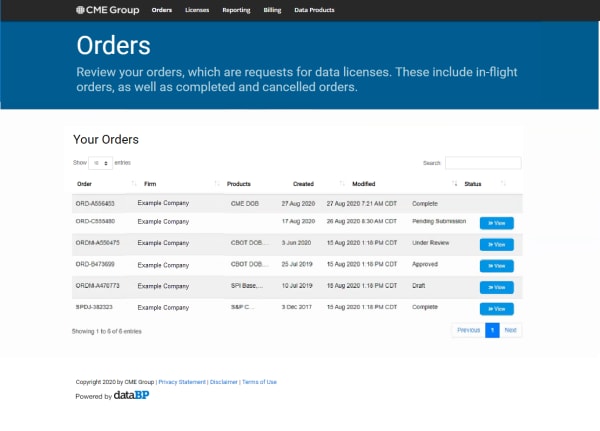
Select Orders from the Menu Bar or View Orders from the Landing page.
This allows you to review your orders, which are requests for data licenses. These include in-flight orders, as well as completed and canceled orders. The statuses are:
- Draft
- Pending Submission
- Under Review
- Approved
- Complete
For new customers, please watch the CME Market Data Licensing video, which describes the onboarding process.
Updates to Licenses and Agreement
Customers may receive an invitation from their Global Account Manager to update their license agreements. Updates are done via a maintenance order, which are created by the CME Account Manager and an invitation is provided to Customers via an email, which contains a link to the order in the Data Services portal. You may also access your orders from the portal by selecting Orders in the Menu Bar. From the Your Orders list, select >>View for the order.
View Orders - Status
You can view the progress of your request for data licenses from the Orders screen.
Note: If you would like to update your license agreement, please reach out to your Global Account Manager to begin this process.
- View Order Details
- Select >>View for an order that is in Draft status.
The system displays the status of the order information, depending on where it is in the process:
The user can continue the process by providing the necessary data or affirmations in the various sections such as:- Primary Address
- Default Billing Account
- Company Contacts
- Confirm Licenses
- Feed Supplier Management
- Services - Update/Affirm
- Affiliates - Update/Affirm
- Service Facilitators - Update/Affirm
- Use the PREVIOUS, NEXT or select the Step # shown on the right to navigate through the required steps of Information Licensing Agreement (ILA) process.
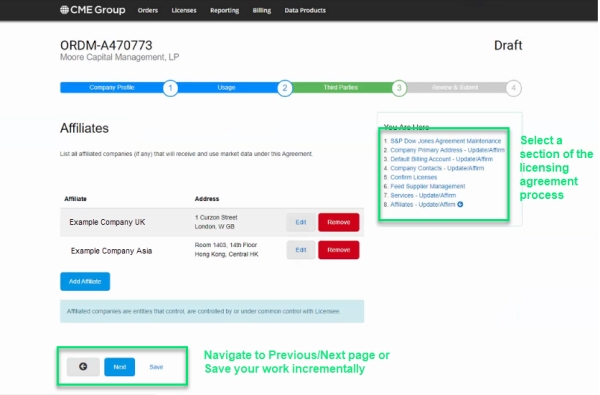
- Select Save to save your entries. You may save incremental progress when editing your licensing requirements and come back to the screen at a later time.
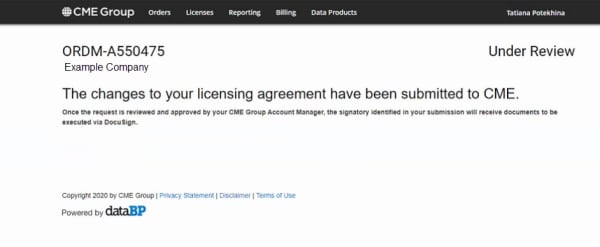
Note: When an order status is Pending Submission, Under Review, Approved, or Complete, a message to that affect appears. The following shows an example of status "Under Review."