User Help System
Additional Data for As-Needed and Location-Based Reporting
You can view additional data for as-needed and location-based reporting, such as reporting codes, past reports, and a current list of licenses.
- To view additional data for as-needed and location-based reporting
- Select Reporting > Location and Service Reporting from the Menu Bar.
On the Reporting page, menu options are displayed in the As-Needed and Location Based sections.
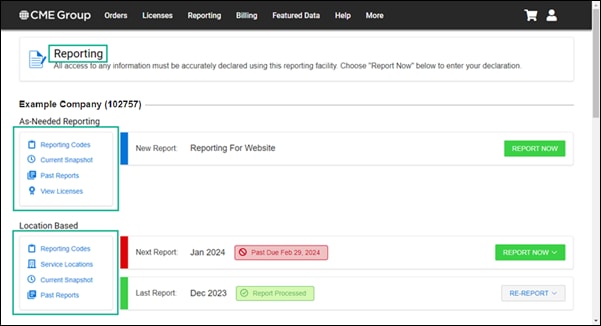
- Select each menu option to view the following:
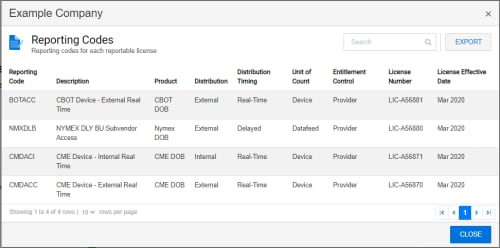
- Reporting Codes- displays the Reporting Code for each reportable license, as well as the Product, Description, Distribution, Distribution Timing, Unit of Count, Entitlement Control, License Number, and License Effective Date. You can also EXPORT and download this data.
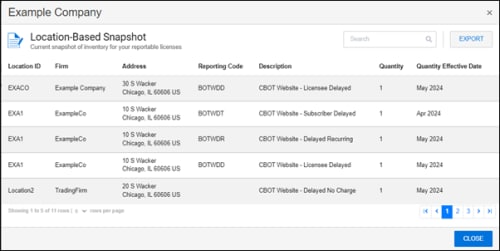
- Current Snapshot - displays the Location ID, Firm, Address, Reporting Code, Description, Quantity, and Quantity Effective Date for your current inventory. You can also EXPORT and download this data.
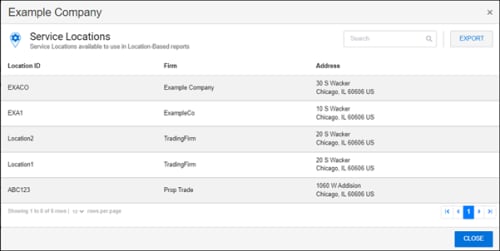
- Service Locations - displays the Location ID, Firm, and Address for monthly location-based reporting. You can also EXPORT and download this data.
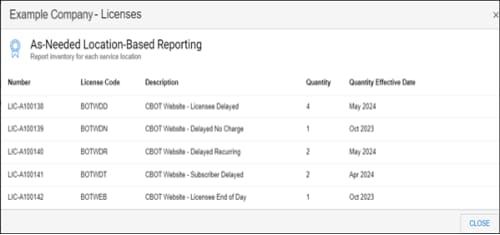
- View Licenses - displays the License Number, License Code, Description, Quantity, and Quantity Effective Date per location or service for as-needed inventory reporting.
- Past Reports - displays the list of past reports. You can also EXPORT and download these reports.
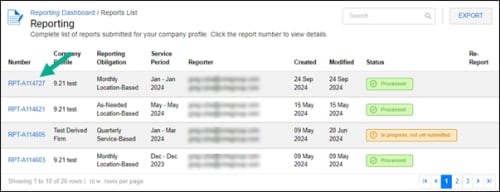
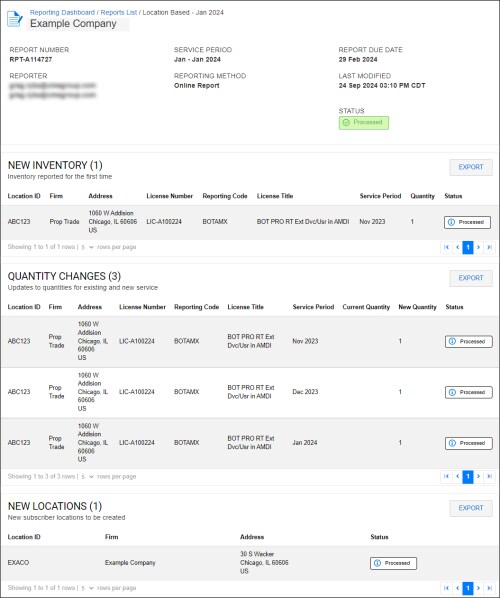
- Select the Past Report Number to view the NEW INVENTORY, QUANTITY CHANGES, and NEW LOCATIONS sections in the report.
- Select the Past Report Number to view the NEW INVENTORY, QUANTITY CHANGES, and NEW LOCATIONS sections in the report.


