User Help System
Adding a Location
Customers who are reporting inventory for a new or first-time location must first add the location in the CME Group Data Services portal.
- To add a Location
- Select Reporting > Location and Service Reporting on the CME Data Services Portal.

- Based on your ILA, select REPORT NOW in either the Location Based (monthly) or As Needed Reporting section.
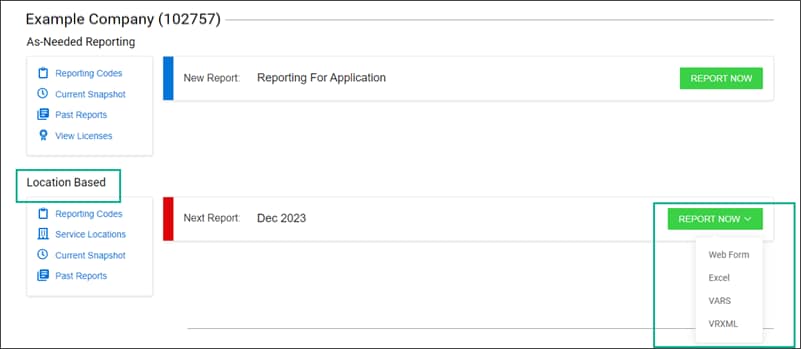
For Location Based reporting, select a report type:
- Web Form - complete a form to report. Note: this option is available if you have no more than 100 lines of data to report. If you have more than 100 lines of data, use the Excel option instead.
- Excel - upload an excel spreadsheet with your report. Note: this option must be used for reports that have more than 100 lines of data.
- VARS
- VRXML
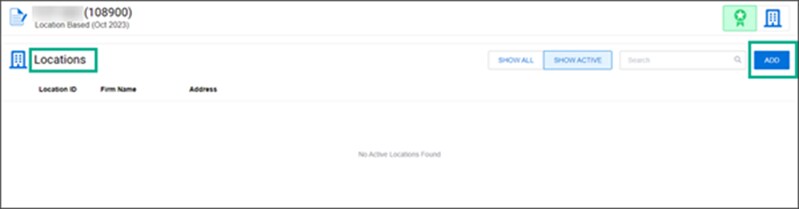
- Select ADD in the Locations section.
- Fill out each field in the Add Location dialog and select CONFIRM.
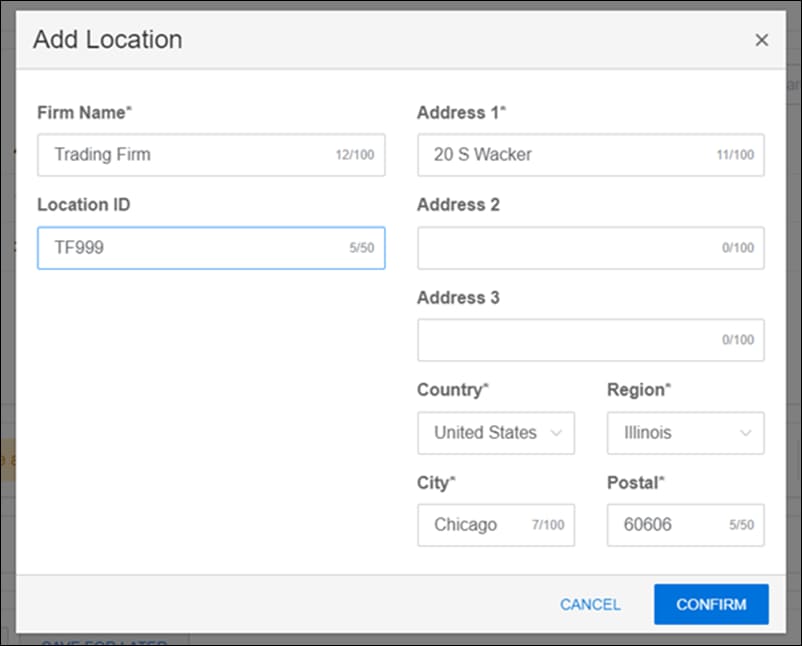
For Location ID, enter a unique, user-defined identifier for the location where a Direct Licensee, Subscriber, or Licensee Group receives market data from CME Group.
Note: You can also add a Location in Excel.
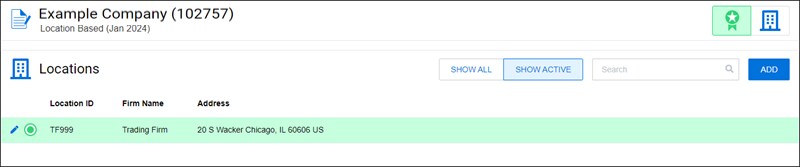
After selecting CONFIRM, the location appears in the Locations section.