User Help System
Complete Federation Single Sign-On Profile
After your enterprise/firm federates your credentials, login to the CME Group platform and complete the Federation Single Sign-On profile with your job role, address, etc.
- First Time Login:
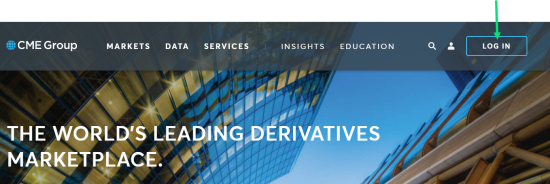
- Go to https://www.cmegroup.com/ and select LOG IN.
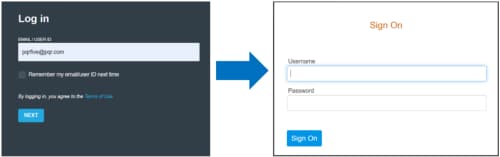
- Enter your enterprise/firm Email Address and press TAB or ENTER on your keyboard and select NEXT.
- Enter your enterprise/firm Usernameand Password and select Sign On.
The Complete your profile screen appears: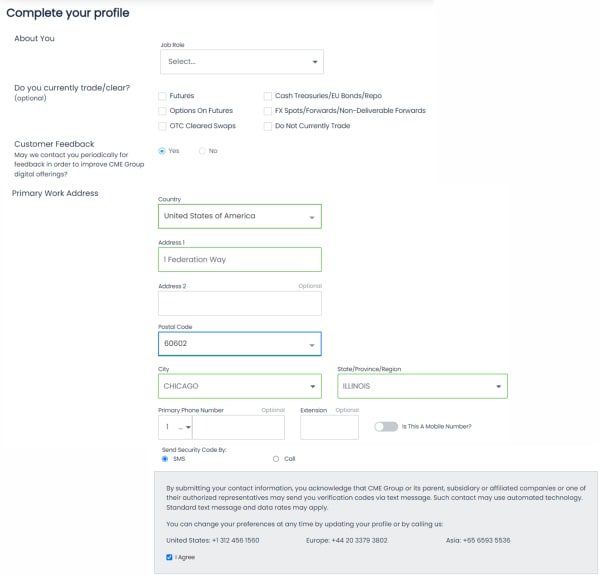
- Select/enter your:
- Job role
- Products
- Feedback preference
- Business Address
- Phone Number (indicate if a mobile number)
- Preference for sending Security Code
- Agree for sending verification code
- Enter at least two security questions/answers:
- Select Let's do it.
- Enter your questions and answers (at least two).

- Optional: To add more questions/answers, select + add another question.
- Read and consent to the CME Group Privacy Notice, Terms Of Use, and Cookie Notice.
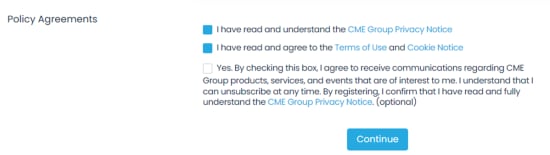
- Optional: Select the box to agree to receive communications.
- Select Continue.


