User Help System
Cancel on Behalf - Futures & Options
Using the Cancel on Behalf page, authorized users can enable Cancel on Behalf (COB) functionality for Globex Firm ID (GFID) - Session IDs in the New Release / CERT environment to send and receive cancel on behalf messages via the iLink order entry gateway.
To transmit COB messages, ensure the GFID and order entry sessions are setup prior to enabling source sendercomp sessions.
Note: For additional information refer to Client Systems wiki - Trading on Behalf of a Client - Cancel on Behalf.
Enabling Cancel on Behalf
- To enable Cancel on Behalf:
- From the Futures & Options Requests menu, select Cancel on Behalf, then make a selection in the Company drop-down menu, if necessary.
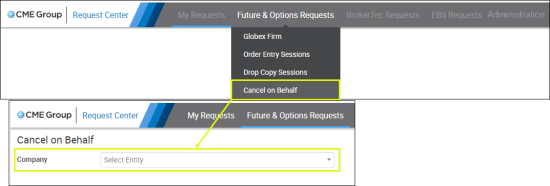
- From the Cancel on Behalf page, select Environment: , Globex Firm ID.
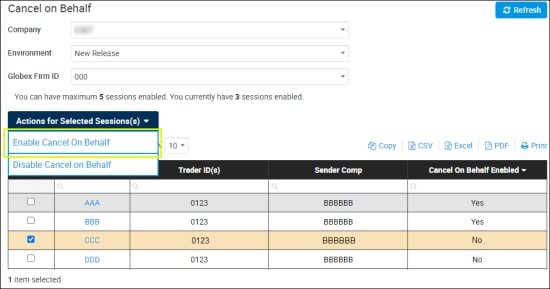
A list of Session IDs, for the selected GFID, appears.
- Select the Session ID(s) to enable , then select Actions for Selected Session(s) > Enable Cancel on Behalf.
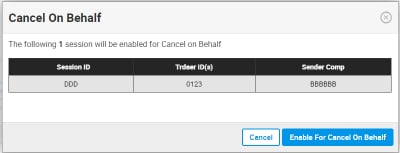
- On the dialog that appears, review the selected session information, then select Enable for Cancel on Behalf.
A confirmation banner appears, the request appears on the My Requests page and an email message is sent to the requestor.

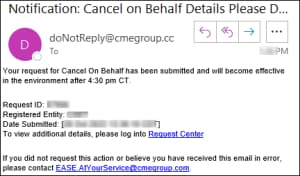
Cancel on Behalf will be effective for the selected session after 4:30 pm CT and available for the next trading session.
Disabling Cancel on Behalf
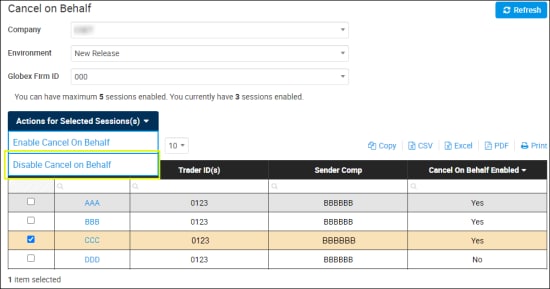
- From the Cancel on Behalf page, select Environment: , Globex Firm ID.
- Select the Session ID(s) to disable (up to ten), then select Actions for Selected Session(s) > Disable Cancel on Behalf.
- On the dialog that appears, review the selected session information, then select Disable for Cancel on Behalf.
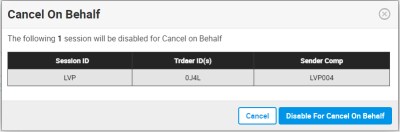
A confirmation message appears, the request appears on the My Requests page and an email message is sent to the requestor.
Cancel on Behalf will be disabled for the selected session after 4:30 pm CT and restricted for subsequent trading sessions.


